
TL;DR
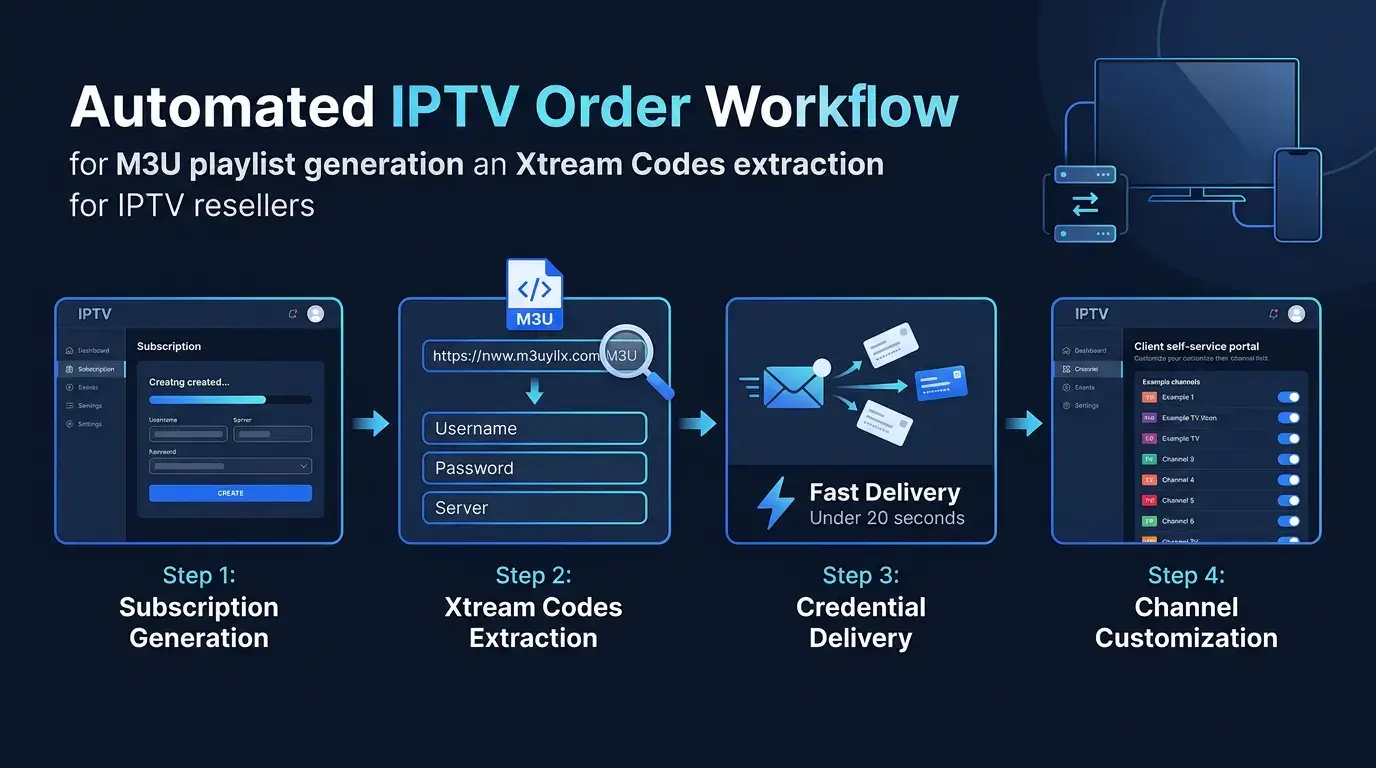
- Every IPTV order takes four steps: create the subscription, extract the Xtream Codes, send them to the client and customize the channel list. Most resellers automate only the first.
- An M3U playlist generator that only creates the link still leaves you copying usernames, passwords and servers by hand.
- Custom scripts fix one step and leave a ceiling, often around 20 to 30 orders a day.
- AutoTaskClick handles all four steps, emails credentials in about 20 seconds and lets clients edit their own channel list.
- Start with a $1 trial for 20 orders, then from $0.55 per order with no monthly fees.
If you sell IPTV subscriptions, you know the routine. A client pays, you open the panel, create the subscription, pull the username, password and server out of the M3U link, paste them into a message and send it. Then the client asks you to remove three channels. Fifteen times a day is manageable. Fifty times a day eats your whole schedule.
That's why so many resellers look for an M3U playlist generator. But generating the link was never the hard part. The hard part is everything after the panel gives it to you. This guide breaks down that process and shows where automation needs to step in.
What Is an M3U Playlist Generator, and Why Does It Matter for Resellers?
An M3U playlist generator produces the link that bundles a client's server address, username and password into one URL. Your reseller panel creates it automatically when you add a subscription. The link points to a playlist in the M3U format, which is built for a player app to read, not for a person.
A typical Xtream-style M3U link looks like this:
http://server.example.com:8080/get.php?username=USER&password=PASS&type=m3u_plus&output=ts
Everything a client needs is inside that one link. The reseller's real job is pulling it apart into clean fields the client can use, quickly and without mistakes, on every order.
M3U Link vs Xtream Codes: What Clients Actually Want
Clients on apps like TiviMate, IPTV Smarters or IBO Player usually don't want to paste a long M3U string. They want the server, username and password as Xtream Codes, because that login loads categories, VOD and the electronic program guide (EPG) automatically instead of a flat channel list.
| Field | Where it is in the M3U link | Example |
|---|---|---|
| Server URL | Everything before /get.php | http://server.example.com:8080 |
| Username | The value after username= | USER |
| Password | The value after password= | PASS |
The best delivery email includes both: the Xtream Codes login for apps that support it, and the full M3U link for players that only accept a playlist URL.
The Four Steps Every IPTV Order Requires
Strip away the marketing and every IPTV order comes down to four steps:
| Step | Done by hand | With AutoTaskClick |
|---|---|---|
| 1. Create the subscription | Log in to the panel, fill the form, pick the package | Automatic after payment |
| 2. Extract the Xtream Codes | Copy the server, username and password out of the URL | Automatic |
| 3. Send the credentials | Paste them into a message and send it | Branded email in about 20 seconds |
| 4. Customize the channel list | Edit channels per client on request | Client does it in the portal |
Most resellers we talk to have automated only step one, because the panel does it by default. The other three still happen by hand. If you consider yourself "mostly automated" because step one runs itself, you're not as far along as you think. Our guide on manual tasks IPTV resellers should stop doing shows which tasks resellers wrongly assume are automated.
Why a Custom M3U Link Generator Script Becomes a Scaling Trap
We worked with a reseller in Italy who had already built his own script. It pulled the username, password and server from the M3U link and dropped them into a message template he'd written. When we suggested he try AutoTaskClick, he turned us down more than once.
What he didn't see at the time: his script automated only one of the four steps. He still created each subscription in the panel, sent each message himself and edited every client's channel list by hand. It felt like automation, but it was a faster way to do a quarter of the job.
He got stuck around 30 orders a day and couldn't work out why scaling felt impossible, however much he improved the script. Scripts like this are also fragile: a change in the panel's link format or a panel migration breaks them, and you're back to doing it by hand.
When he finally moved to AutoTaskClick and all four steps ran on their own, he had time to test new marketing instead of looking after his script. He passed 100 orders a day. The lesson isn't that his script was badly written. It's that automating one step out of four was never going to get him past the ceiling set by the other three.
How Does AutoTaskClick Automate Xtream Codes Extraction?
When a client pays, AutoTaskClick creates the line on your panel, takes the server, username and password from the new subscription, puts them into your email template and sends them, usually about 20 seconds after payment. No copying values out of a URL and no message to write.
The email templates are fully customizable, so the message carries your brand, not a generic system notice. It works with your panel login, no API required. See our panel guides for Strong 8K and Kemo, or the full list on the features page.
No panel yet? Start with AutoTask 8K
Every AutoTaskClick account includes the AutoTask 8K IPTV reseller panel, already connected, with a trial plan for testing. AutoTask 8K orders have $0 per-order fees, and you buy credits only when you're ready to sell.
Can Clients Customize Their Own Channel List?
Yes. AutoTaskClick includes a client portal where customers can edit their own channel list without messaging you first. They can also view and renew their subscription and retrieve their credentials.
Channel requests are a problem most resellers don't notice until they're buried in them. Every time a client wants three channels removed or five added, that's another message for you to handle. A self-service portal removes that whole category of work, and clients usually prefer it because the change is instant.
How Do You Handle Buffering and Switch Servers?
Sometimes the fix for buffering is a different server. We had a client in Spain who was buffering constantly on the Kemo server he'd been given by default, because it didn't perform well in his region. We moved him to Strong 8K and the buffering stopped.
Server swaps happen more often than people expect, and they shouldn't mean redoing all four steps by hand. AutoTaskClick supports Strong 8K, Kemo, MegaOTT and AutoTask 8K, and other panels can be added on request for a one-time setup fee, so moving a client to another panel doesn't mean changing your workflow. If a client keeps reporting buffering, our support team can help you pick the panel that fits their region.
What Does It Cost to Automate M3U Generation and Delivery?
| Volume | Price per order |
|---|---|
| Trial | $1 for your first 20 orders |
| 1–100 orders | $0.55 |
| 101–500 orders | $0.45 |
| 501+ orders | $0.35 |
| AutoTask 8K orders | $0 |
There are no monthly fees. Panels outside the supported list have a one-time setup fee.
Compare that with building your own script. A script feels free at first, but you pay for it in the three steps it doesn't automate and in the hours spent fixing it every time a panel changes. Full details are on the pricing page.
Getting Started in 5 Steps
- Create your account and start the $1 trial for your first 20 orders.
- Connect your IPTV panel (or use the included AutoTask 8K panel) and your email settings.
- Connect your payment methods, such as PayPal, Stripe, cards or crypto.
- Set up your checkout, sign-up and sign-in pages.
- Add the checkout to your website and start taking orders.
Setup usually takes about 30 minutes. It can take longer if your sending domain has no email authentication yet or a payment account needs attention, but for most resellers it's done the same day. You can preview the client experience on the demo checkout, and the IPTV automation guide covers what to do with the time you get back.
Frequently Asked Questions
What is an M3U playlist generator for IPTV resellers?
An M3U playlist generator produces the M3U link that bundles a client's server address, username and password into one URL. Your reseller panel creates it when you add a subscription, but most clients prefer the Xtream Codes format, so those values still need to be extracted and sent to them.
How do I extract Xtream Codes from an M3U link?
In a typical M3U link such as http://server:port/get.php?username=USER&password=PASS&type=m3u_plus, the server is the part before /get.php, the username follows username= and the password follows password=. AutoTaskClick does this automatically for every order and emails the three values to the client in about 20 seconds.
Should I send clients an M3U link or Xtream Codes?
Send both when you can. Apps like TiviMate and IPTV Smarters work best with Xtream Codes because they load categories, VOD and the EPG automatically. The M3U link is useful for players that only accept a playlist URL.
Which IPTV panels does AutoTaskClick support?
AutoTaskClick supports Strong 8K, Kemo, MegaOTT and its own AutoTask 8K panel. It connects with your panel login, no API needed. Other panels can be added on request for a one-time setup fee.
Can IPTV clients customize their own channel list?
Yes. AutoTaskClick includes a client portal where customers can edit their channel list, view and renew their subscription and retrieve their credentials without contacting you.
How much does it cost to automate M3U generation and delivery?
The AutoTaskClick trial costs $1 for your first 20 orders. After that you pay per order: $0.55 for 1 to 100 orders, $0.45 for 101 to 500 and $0.35 for 501 and more. Orders on the AutoTask 8K panel have $0 per-order fees. There are no monthly fees.
Stop Patching Scripts Together
An M3U playlist generator was never the finish line. Generating the link is the easy quarter of the job. Extracting the Xtream Codes, sending them and handling channel requests are the rest, and that's where most resellers, including those with their own scripts, are still working by hand.
Automate all four steps and the ceiling most resellers hit at 20 to 30 orders a day stops being a wall. Stop touching every order by hand.