Last updated: July 2026 · Reading time: 20 min · Expertise: Payment Processing & Fintech
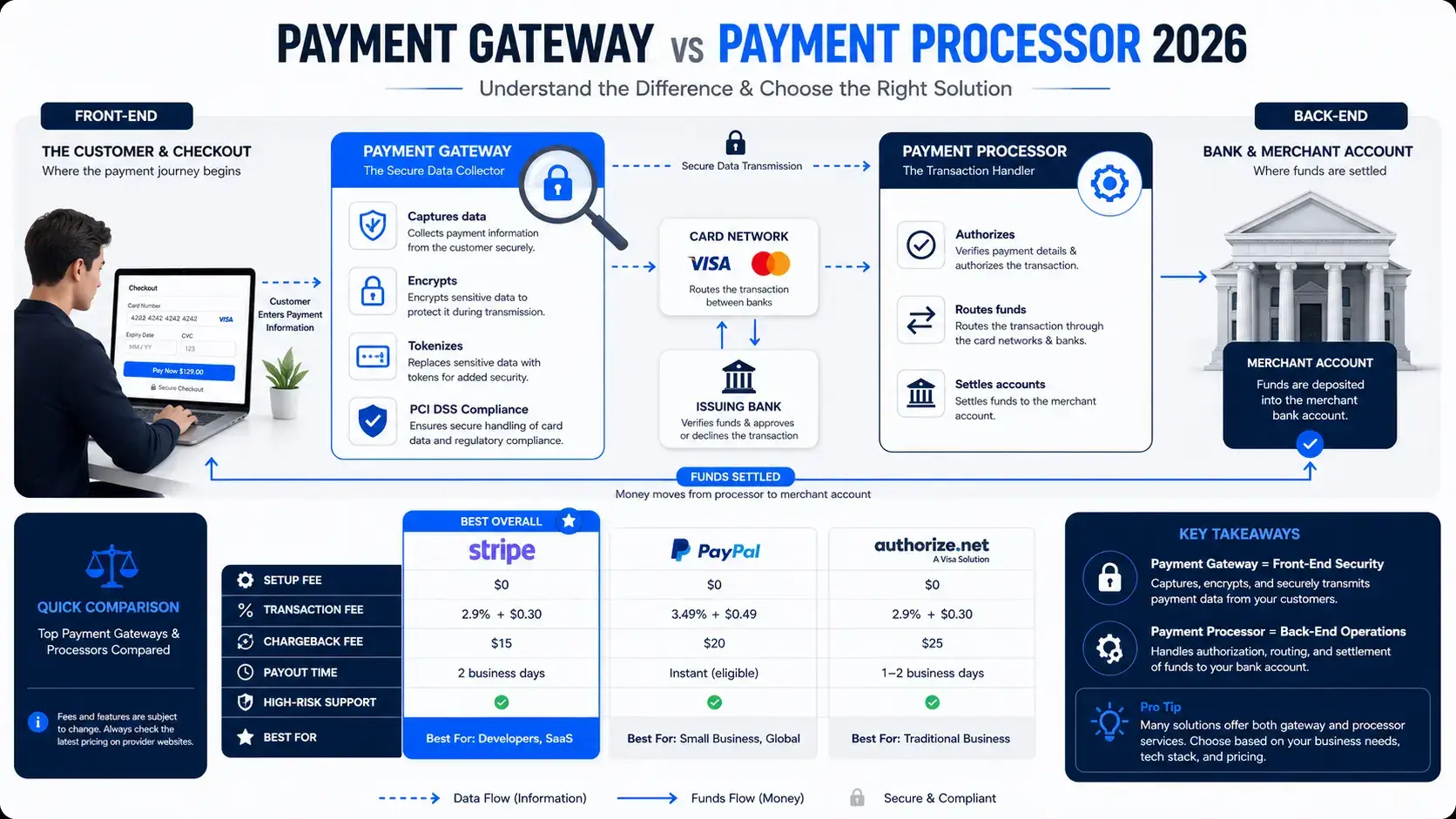
If you run an online business, you've probably seen the terms "payment gateway" and "payment processor" used interchangeably. But they are not the same thing. Understanding the difference between a payment gateway vs payment processor is critical for choosing the right payment infrastructure, managing costs, and avoiding operational headaches. The gateway captures and encrypts customer payment data at checkout. The processor authorizes the transaction and moves the money between banks. The gateway is what your customer sees; the processor is what your bank sees.
In this comprehensive guide, we break down the payment gateway vs payment processor distinction, compare the leading providers (Stripe, PayPal, Authorize.net), explore high-risk payment solutions, and show you how to choose the right setup for your business. Whether you're selling digital products, running a subscription service, or managing an IPTV reseller business, this guide gives you a clear, actionable roadmap.
A payment gateway is a technology that securely transmits payment information between the customer, the business, and the payment processor. It acts as the digital equivalent of a point-of-sale terminal in a physical store. Think of it as the front door of your checkout process — it's what your customer interacts with when they enter their card details.
When a customer enters their payment details on your website, the gateway captures that data, encrypts it using secure protocols, and replaces the card number with a secure token (a process called tokenization). This tokenization protects sensitive information from being exposed as it travels through the payments chain. The gateway then sends the encrypted data to the payment processor for authorization.
Payment gateways also handle security compliance, including PCI DSS requirements, PSD2 (Strong Customer Authentication), and 3D Secure authentication. Popular payment gateways include Authorize.net, Stripe (which combines gateway and processor functions), and PayPal.
A payment processor is a service that enables your business to accept electronic payments — credit cards, debit cards, digital wallets, and more. While the gateway handles the front-end data capture, the processor works behind the scenes to authorize the transaction and move the money between banks. The processor is the back office of your payment flow.
Once the gateway sends the encrypted payment data, the processor takes over. It routes the information through the relevant card network (Visa, Mastercard, etc.) and communicates with the customer's issuing bank to verify that the payment details are valid and that sufficient funds are available. The processor then requests authorization, manages the clearing process, and coordinates the movement of funds into your merchant account.
Processors handle card scheme rules, AML (anti-money laundering) controls, and settlement operations. They typically charge fees as a percentage of the transaction amount, plus a per-transaction fee. Examples of payment processors include Stripe (which also provides gateway services), PayPal, and traditional merchant acquirers like Chase Paymentech or Wells Fargo.
The core difference between a payment gateway vs payment processor comes down to front-end versus back-end. The gateway is customer-facing; the processor is bank-facing. Here's a side-by-side comparison:
Payment Gateway: Captures, encrypts, and transmits payment data from the customer to the processor. It handles security, tokenization, and compliance with PCI DSS and 3D Secure.
Payment Processor: Routes the transaction through card networks, requests authorization from the issuing bank, and settles funds into your merchant account. It handles card scheme rules, AML controls, and settlement operations.
Payment Gateway: Visible to the customer — it's the checkout page where they enter their payment details.
Payment Processor: Invisible to the customer — it operates entirely behind the scenes.
Payment Gateway: PCI DSS, PSD2, Strong Customer Authentication (3D Secure).
Payment Processor: Card scheme rules, AML controls, financial operations.
Payment Gateway: Transaction fees, monthly platform fees.
Payment Processor: Merchant service charges, percentage-based fees, Interchange++ pricing models.
The gateway and processor work in sequence to complete the authorization cycle — typically in a matter of seconds. Here's the step-by-step flow:
Here's a detailed comparison of three leading payment providers, each offering different combinations of gateway and processor functionality.
Stripe is a full-stack payments processor that combines gateway and processor functions into one platform. It's known for its developer-friendly API and extensive integrations. Stripe is PCI DSS Level 1 certified — the most stringent certification level in the payments industry.
Pricing: 2.9% + $0.30 per U.S. transaction. No monthly fees, no setup fees. Chargeback fee: $15 (refunded if resolved in your favor).
Best for: Developers, SaaS businesses, subscription services, and businesses with less than $1 million in annual revenue.
PayPal is the most recognized consumer payment brand, holding approximately 45% of the global payment gateway market. PayPal Standard redirects customers to PayPal's site to complete payment. PayPal Payments Pro offers a more integrated checkout experience.
Pricing: PayPal Standard: 2.9% + $0.30 per U.S. transaction, no monthly fees. PayPal Payments Pro: 2.9% + $0.30, plus a $30 monthly fee. Chargeback fee: $20 (refunded if resolved in your favor).
Best for: Businesses that want consumer trust and rapid onboarding. However, PayPal is known for terminating high-risk accounts, including IPTV businesses.
Authorize.net is a veteran payment gateway that offers both a gateway-only option (bring your own merchant account) and an all-in-one plan (gateway + merchant account). It's a reliable, secure payment gateway with easy credit card processing, recurring billing, and broad website integration.
Pricing: Gateway-only: $25/month + $0.10 per transaction + $0.10 daily batch fee. All-in-one: $25/month + 2.9% + $0.30 per transaction. Chargeback fee: $25 (refunded if resolved in your favor).
Best for: Medium to large businesses that need a robust, customizable payment system. Authorize.net is well-suited for B2B and businesses with complex recurring billing needs.
| Feature | Stripe | PayPal Standard | PayPal Payments Pro | Authorize.net |
|---|---|---|---|---|
| Monthly Fee | $0 | $0 | $30 | $25 |
| Per-Transaction Fee | 2.9% + $0.30 | 2.9% + $0.30 | 2.9% + $0.30 | $0.10 + $0.10 daily batch |
| Chargeback Fee | $15 | $20 | $20 | $25 |
| PCI Level 1 | ✅ Yes | ✅ Yes | ✅ Yes | ✅ Yes |
| Developer API | ✅ Excellent | ✅ Good | ✅ Good | ✅ Good |
| High-Risk Friendly | ⚠️ No | ⚠️ No | ⚠️ No | ⚠️ No |
| Best For | Developers, SaaS | Consumer trust | Integrated checkout | B2B, recurring billing |
A high-risk merchant account is a payment processing setup designed for businesses that present elevated financial, regulatory, or operational risk. These accounts are for businesses with higher dispute rates, regulatory complexity, or operational risk. High-risk businesses include IPTV, digital goods, subscription services, forex, gaming, and adult content.
A high-risk payment gateway is a gateway that supports high-risk merchants with advanced fraud detection, chargeback management tools, multi-currency support, and smart transaction routing. High-risk gateways also help reduce dependency on a single acquiring route.
Traditional payment processors like Stripe and PayPal have strict policies against high-risk industries. PayPal's Acceptable Use Policy explicitly prohibits "streaming services that infringe copyright". IPTV sellers accepting credit cards are engaged in transaction laundering approximately 75% of the time. This makes them a high-risk target for payment processors.
High-risk businesses need a payment gateway that can handle higher decline rates, stricter underwriting, chargeback pressure, fraud checks, regional payment preferences, and the constant risk of account holds.
Payment gateway integration services help you connect your chosen gateway to your e-commerce platform, website, or custom application. A well-integrated payment gateway ensures smooth checkout experiences, reduces cart abandonment, and automates payment reconciliation.
Choosing the right payment gateway vs payment processor setup depends on your business size, industry, customer base, and risk profile. Follow this decision framework:
For IPTV resellers and digital businesses, choosing the right payment gateway vs payment processor is only half the battle. Even with a high-risk merchant account, you still face chargebacks, account holds, and the constant threat of termination. Autotaskclick provides a complete payment protection layer that works with any gateway — PayPal, Stripe, high-risk accounts, crypto, and more.
Autotaskclick allows you to link multiple accounts on each payment gateway. Set a volume threshold per account. When the threshold is reached, the system automatically stops routing payments to that account and switches to a backup account. This reduces risk by 50% and allows you to "warm up" new accounts safely by controlling transaction volume.
Autotaskclick uses a professional redirection system that passes through a legitimate storefront selling legal products. The system collects different products in different quantities that equal the total amount of the customer's purchase. This means payment providers see only legal e-commerce transactions — not IPTV or digital goods keywords. You can also download receipts from the legal product store for verification purposes.
Competitors often try to report payment accounts by making test purchases from different countries. Autotaskclick defeats this with country-based routing: assign different payment options (and even different WhatsApp numbers) to different customer countries. Competitors from other regions see fake or limited payment options — protecting your real accounts from being flagged or reported.
When all payment methods fail (e.g., all thresholds reached), Autotaskclick displays a WhatsApp number. Customers can contact you directly for manual payment arrangements, ensuring you never lose a sale.
Most disputes for digital businesses come from "item not received" claims. Even a 1-hour delay can trigger a chargeback. Autotaskclick automates delivery and ensures customers receive their access within 20 seconds — lower disputes = lower risk flags.
A payment gateway captures, encrypts, and transmits payment data from the customer to the processor. A payment processor authorizes the transaction and moves the money between banks. The gateway is front-end (customer-facing); the processor is back-end (bank-facing).
Yes. Most businesses that accept online payments need both functions. The real choice is whether you source them separately or through a single provider like Stripe or PayPal.
It depends on your business. Stripe is best for developers and SaaS. PayPal is best for consumer trust and rapid onboarding. Authorize.net is best for B2B and recurring billing. None of these are suitable for high-risk industries like IPTV.
A high-risk payment gateway is a gateway designed for businesses with elevated risk profiles — such as IPTV, digital goods, subscription services, forex, and gaming. These gateways offer advanced fraud detection, chargeback management, and multi-acquirer redundancy.
Stripe and PayPal are not recommended for IPTV payments. Both platforms have strict policies against high-risk industries and will terminate accounts without warning. Use a high-risk merchant account or specialized gateway instead.
Autotaskclick provides multi‑layer protection: thresholds per account to limit volume exposure, plan‑specific routing to control volume, a payment bridge that redirects through a legal product store, country‑based routing to block competitors, and instant delivery to reduce disputes.
Payment gateway integration services help you connect your chosen gateway to your e-commerce platform, website, or custom application. A well-integrated gateway ensures smooth checkout experiences, reduces cart abandonment, and automates payment reconciliation.
Understanding the difference between a payment gateway vs payment processor is essential for building a reliable, cost-effective payment infrastructure. The gateway captures and secures payment data at checkout; the processor authorizes and settles the funds. For most businesses, a combined solution like Stripe or PayPal works well. But for high-risk industries like IPTV, digital goods, and subscription services, standard processors will eventually ban your account.
The solution is a layered strategy: a high-risk merchant account for card payments, a specialized gateway for multi-acquirer redundancy, and a protection layer like Autotaskclick to manage thresholds, redirection, country-based routing, and instant delivery. With the right setup, you can accept payments safely, reduce disputes, and scale your business without fear of sudden termination.
Now that you understand the payment landscape, it's time to protect your revenue and build a payment strategy that works for your business.
Autotaskclick helps IPTV resellers and digital businesses automate payment routing, protect accounts with thresholds, and deliver subscriptions instantly — all in one platform. Start your free trial today.
Start Your Free Trial →