Last updated: September 2026 · Reading time: 14 min · Expert level: Beginner to Advanced
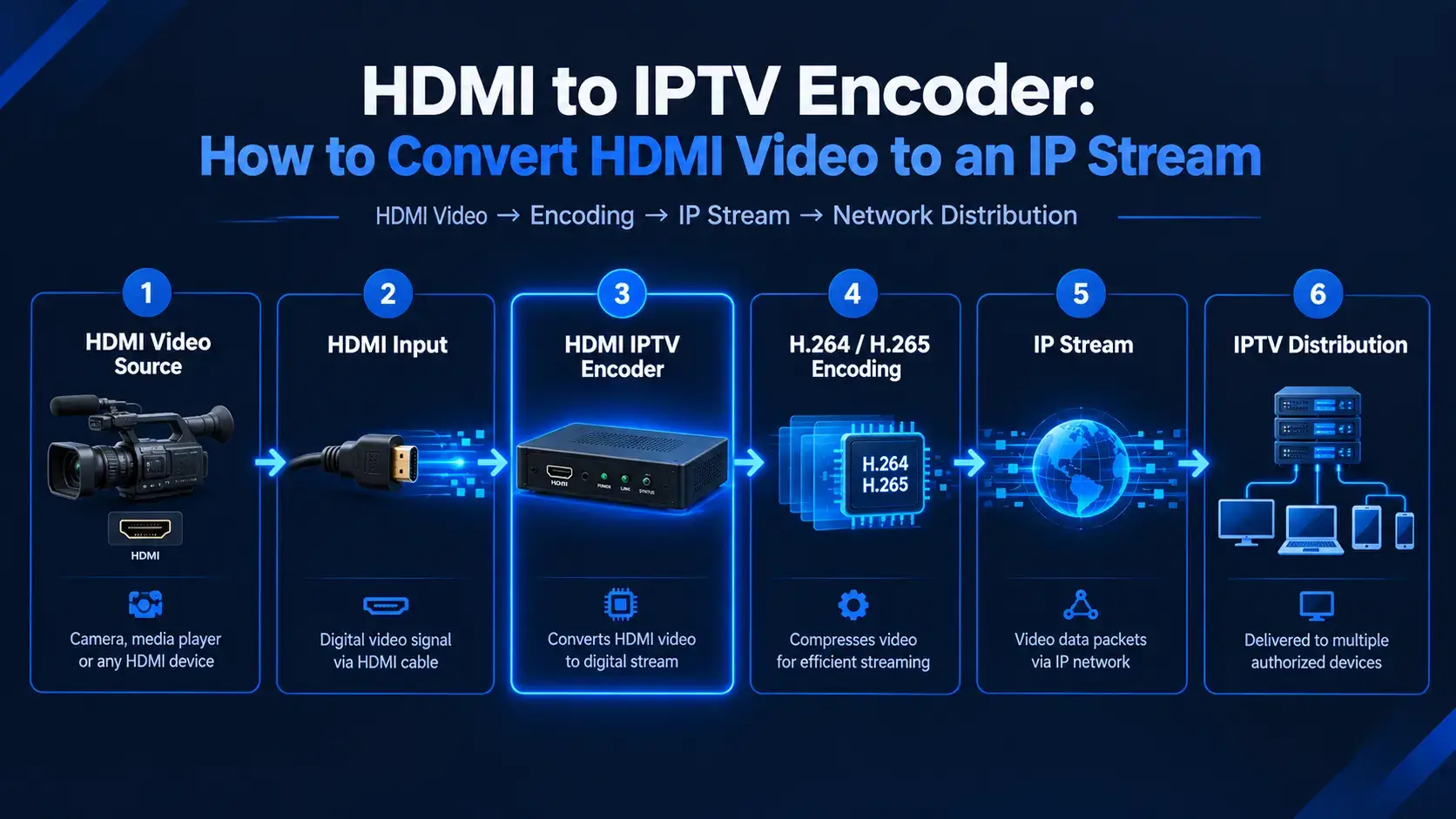
Every IPTV service begins with a source signal. In most commercial deployments, that signal arrives through HDMI — from a satellite receiver, a media player, a camera, or a broadcast set-top box. The problem is that HDMI is a short-range, point-to-point interface. It cannot travel across a network. To distribute that video to multiple viewers, you need to convert it into an IP stream.
That's the job of an HDMI to IPTV encoder. It captures the HDMI signal, compresses it using a video codec, packages the result into IP packets, and sends it across the network for delivery to players, set-top boxes, and apps. Understanding how this works is essential for anyone building or evaluating an IPTV streaming workflow.
An HDMI to IPTV encoder is a hardware device that accepts an HDMI video signal, compresses it using a codec such as H.264 or H.265, and outputs the compressed video as an IP stream that can be distributed across a network. It is the bridge between a physical video source and a network-based delivery system.
Without an encoder, HDMI video is trapped in a cable. It can only travel a few meters before signal degradation begins. With an encoder, that same video becomes a data stream that can reach thousands of viewers simultaneously — across a LAN, across a WAN, or across the public internet.
An HDMI IPTV encoder is distinct from a simple HDMI extender, which stretches a signal over a longer cable without converting it to IP. It's also distinct from a player or set-top box, which receives an IP stream and converts it back to video for display. The encoder sits at the origin of the signal chain — it creates the stream. The player sits at the destination — it consumes the stream.
For IPTV resellers, the encoder itself is often invisible. Resellers buy streams from upstream providers who operate the encoding infrastructure. But understanding what an encoder does helps resellers evaluate their supply chain, plan bandwidth, and diagnose issues when they arise.
The conversion process happens in four distinct stages. Each stage affects the quality, latency, and bandwidth consumption of the final stream.
The process begins with an HDMI source. This can be a satellite receiver, a cable set-top box, a media player, a computer, a camera, or any device that outputs video over HDMI. The encoder connects to this source via a standard HDMI cable and captures the digital video and audio signal.
HDMI supports resolutions up to 4K at 60Hz, along with multi-channel audio and HDCP content protection. For IPTV deployments, the most common source resolutions are 1080p and 4K. The source quality sets the ceiling for the final stream quality — an encoder cannot improve on what it receives.
The encoder compresses the raw HDMI signal using a video codec. This is the most technically demanding part of the process. Raw HDMI video contains enormous amounts of data — a single 1080p60 uncompressed stream runs at approximately 3 Gbps, and a 4K stream can exceed 12 Gbps. Delivering that over any practical network is impossible.
Compression reduces the data rate to something manageable. The two dominant codecs are:
Some modern encoders support both codecs simultaneously, allowing operators to serve HEVC to capable devices and H.264 to legacy devices from the same source signal.
Once the video is compressed, the encoder packages it into IP packets using a streaming transport protocol. The choice of protocol determines latency, reliability, and compatibility with downstream distribution systems.
| Protocol | Typical Latency | Best Used For |
|---|---|---|
| RTMP | 2–5 seconds | CDN ingest |
| SRT | 0.5–2 seconds | IPTV contribution over unstable networks |
| HLS / DASH | 6–30 seconds | Wide-scale viewer delivery |
| UDP / RTP | <500 ms | LAN multicast, closed IPTV networks |
For IPTV deployments where the stream travels across the public internet before reaching the distribution server, SRT has become increasingly popular because it delivers low latency over unstable connections. For closed LAN environments, UDP multicast is the most efficient transport.
The final stage is distribution. The encoder outputs the IP stream through its network interface — typically a standard Ethernet port, sometimes with redundant connections for reliability. From there, the stream travels to a streaming server, a CDN, or directly to the player application.
In a typical IPTV setup, the encoder feeds a streaming server that repackages the stream for different delivery protocols. The server might simultaneously produce HLS streams for web players, RTSP streams for set-top boxes, and UDP multicast streams for internal distribution. From the viewer's perspective, the stream appears instantly — but behind the scenes, the encoder has done the heavy lifting of converting a physical signal into a distributable digital asset.

The terms "encoder" and "converter" are often used interchangeably, but they describe different things. Understanding the distinction matters when you're specifying equipment or troubleshooting a deployment.
An HDMI to IPTV encoder compresses video and produces an IP stream. It is an active device that performs real-time video processing. The output is a network stream that can be delivered to multiple viewers simultaneously. Encoders are used to build IPTV services — they are the origin point of the content that eventually reaches customer devices.
An HDMI to IPTV converter typically refers to a device that converts HDMI to a different physical interface — such as HDMI to SDI, or HDMI to composite — without producing an IP stream. Some manufacturers use "converter" to describe a device that does encode to IP, which is where the confusion arises. But strictly speaking, a converter changes the interface; an encoder produces a stream.
In practical terms: if the device's output is an IP network stream, it is an encoder. If the output is another physical video interface, it is a converter. When shopping for IPTV infrastructure, you want an encoder.
If you're building an IPTV service or feeding content into a streaming platform, you need an encoder. If you're adapting an HDMI source to work with a different physical input on existing equipment, you need a converter. The two serve different purposes, and confusing them leads to equipment that doesn't fit the deployment.
Not all encoders are built for the same use case. The specifications that matter most depend on your deployment — whether it's a single-channel hotel installation, a multi-channel broadcast facility, or a live event streaming rig.
Match the encoder to the highest resolution you need to support. If your source is 1080p, an HD encoder is sufficient. If you're delivering 4K content, you need a 4K-capable encoder. Some encoders support 4K input but output only 1080p — read the specifications carefully.
H.264 support is mandatory for broad device compatibility. H.265 support is essential if you need to deliver 4K efficiently. Some encoders also support AV1, though AV1 hardware encoding is still less common. For maximum flexibility, choose an encoder that supports both H.264 and H.265 simultaneously.
Bitrate determines the balance between quality and bandwidth consumption. Look for an encoder with a wide adjustable range — from as low as 0.1 Mbps up to 32 Mbps or more. The ability to fine-tune bitrate per stream is important for adapting to different network conditions and customer devices.
For live sports, betting, and interactive applications, low latency is critical. Look for encoders that support low-latency modes with sub-500ms performance. For standard IPTV distribution, 1–2 seconds of latency is acceptable. The transport protocol matters as much as the encoder — SRT and UDP/RTP deliver lower latency than HLS.
A standard Gigabit Ethernet port is the baseline. Some encoders offer dual Ethernet ports for redundancy, which is valuable in commercial deployments where downtime is not acceptable. PoE (Power over Ethernet) support simplifies installation by running power and data over a single cable.
Single-input encoders are appropriate for one source. Multi-channel encoders support multiple HDMI inputs and can encode them simultaneously — useful for headend installations where dozens of channels need to be processed. The TBS2640V2, for example, supports up to 16 independent HDMI or SDI inputs in a single chassis.
Hardware encoders designed for 24/7 operation typically include fanless designs (no moving parts), redundant power supplies, and robust thermal management. These features matter in commercial deployments where the encoder runs continuously.
A web-based configuration interface is standard on modern encoders. Look for remote monitoring, SNMP support, and multi-device management capabilities. In a headend with dozens of encoders, being able to monitor and configure them all from a single dashboard saves significant time.
An encoder handles the technical streaming layer. It converts HDMI to IP and delivers the stream to the distribution infrastructure. But an IPTV business is more than a stream — it's a subscription service. And that's where automation comes in.
Consider the full chain of an IPTV business:
The left side — content, encoder, stream, service — is the technical infrastructure. It produces the product that customers buy. The right side — order, payment, provisioning, delivery, renewal — is the business infrastructure. It converts viewers into paying customers and keeps them subscribed.
Most technical discussions of IPTV stop at the encoder. But for resellers, the business infrastructure is where the real work happens. Manual order processing, delayed credential delivery, missed renewals — these are the operational problems that limit growth.
The operational side of an IPTV reseller business involves a series of repetitive tasks: processing orders, confirming payments, creating customer accounts, delivering credentials, sending renewal reminders, and managing a client portal. Done manually, these tasks consume hours every day. Done at scale, they require a team.
Automation platforms solve this by connecting the payment layer to the service delivery layer. When a customer pays, the platform detects the confirmation, creates the account on the IPTV reseller panel, delivers credentials within seconds, and tracks the subscription for renewal. No manual work. No delays. No errors.
AutoTaskClick's automation platform focuses on this operational layer. It connects to any IPTV reseller panel using login credentials — no API required — and handles the entire customer lifecycle automatically. The platform includes:
The encoder produces the stream. AutoTaskClick's automation platform manages the customers who subscribe to it. Together, they form the complete IPTV business workflow — technical infrastructure on one side, operational automation on the other.
For a deeper dive into how automation fits into an IPTV business, see our IPTV automation guide. For payment-specific considerations, the IPTV payment gateway guide covers gateway selection and protection.

An HDMI to IPTV encoder is a hardware device that takes an HDMI video signal, compresses it using a codec like H.264 or H.265, and outputs the compressed video as an IP stream for network distribution. It is used to convert physical video sources into streams that can be delivered to multiple viewers over IP networks.
An encoder produces an IP stream — it compresses video and packages it for network delivery. A converter changes one physical interface to another (for example, HDMI to SDI) without producing an IP stream. If the output is a network stream, the device is an encoder. If the output is another physical video interface, it's a converter.
It depends on your content and your audience. If your source is 1080p and your customers are watching on HD devices, an HD encoder is sufficient and more cost-effective. If you're delivering premium sports, hotel content, or high-end commercial displays, a 4K encoder with H.265 support delivers better quality at manageable bitrates.
A 1080p stream typically uses 8–15 Mbps with H.264 or 5–10 Mbps with H.265. A 4K stream uses 15–25 Mbps with H.265 or 25–40 Mbps with H.264. Actual bandwidth depends on the encoder settings, the complexity of the content, and the desired quality level.
Yes. HDMI to IPTV encoders are commonly used for live streaming from cameras, media players, and broadcast equipment. Low-latency encoders support sub-500ms glass-to-glass performance, making them suitable for live events, sports, and interactive applications.
The encoder produces the stream that the reseller sells. But the encoder is only one layer. Resellers also need to manage customers, process payments, deliver credentials, and handle renewals. That operational layer can be automated with platforms like AutoTaskClick, which connect to any IPTV reseller panel and handle the entire customer lifecycle automatically.
The HDMI to IPTV encoder is the starting point of every IPTV stream. It takes a physical video signal, compresses it, and prepares it for distribution across an IP network. Understanding the four stages — source, encoding, streaming, and distribution — helps resellers evaluate infrastructure, plan bandwidth, and troubleshoot issues.
But encoding is only half the equation. The operational side of the business — payments, provisioning, delivery, renewals — is where growth is won or lost. Resellers who automate both layers see lower churn, fewer disputes, and the ability to scale without adding headcount.
Platforms like AutoTaskClick's automation platform connect the technical and operational layers of an IPTV business. The encoder produces the stream. AutoTaskClick manages the customers who subscribe to it. Together, they form a complete, scalable IPTV operation.
If you're ready to move beyond manual workflows and connect your streaming infrastructure to a fully automated subscription business, start with a free trial.
AutoTaskClick connects your streaming infrastructure to a fully automated customer workflow. From payment to provisioning to delivery — all in one platform. No API required. Start your free trial today.
Start Your Free Trial →