
How to Automate Strong 8K Subscription Delivery
Last updated: October 2026 · Reading time: 24 min · Expert level: Beginner to Advanced
- What Strong 8K is and why IPTV resellers use it.
- The manual workflow problem: why Strong 8K panels alone don't eliminate repetitive work.
- How to automate Strong 8K subscription delivery — from order to credentials to renewals.
- Step-by-step setup with AutoTaskClick: connect the panel, create plans, configure checkout, test delivery.
- Manual vs automated workflow comparison, renewal automation, troubleshooting, and FAQs.
A customer sends a message: "I want 3 months." The reseller then has to confirm payment, open the Strong 8K panel, create the customer, select the subscription, generate credentials, copy the information, send it through WhatsApp or email, record the expiration date, and remember to handle the renewal later. One customer isn't difficult. But when you have 10, 50, 100, or 500 customers, the repetitive work becomes the problem.
Strong 8K can be part of a reseller operation, but the panel itself doesn't eliminate the repetitive work surrounding customer orders. The next step is connecting the panel to an automated order and delivery workflow. This guide explains what Strong 8K is, how resellers use it, and how AutoTaskClick connects the entire workflow — from customer checkout to subscription creation, credential delivery, and automated renewals.
📑 Table of Contents
- 1. What Is Strong 8K?
- 2. How Does Strong 8K Work for IPTV Resellers?
- 3. Why Are Strong 8K Resellers Still Doing So Much Manually?
- 4. Does Strong 8K IPTV Use Invoices?
- 5. What Are People Saying About Strong 8K on Reddit?
- 6. What Does a Strong 8K Reseller Need to Automate?
- 7. What Is Strong 8K Subscription Automation?
- 8. How AutoTaskClick Automates Strong 8K Subscription Delivery
- 9. Strong 8K Manual vs. Automated Workflow
- 10. How to Set Up Strong 8K Automation With AutoTaskClick
- 11. How to Automate Strong 8K Renewals
- 12. Can AutoTaskClick Work With an Existing Strong 8K Reseller Setup?
- 13. Strong 8K for Beginners vs. Existing IPTV Resellers
- 14. Strong 8K IPTV Panel Automation — What Should You Automate First?
- 15. Common Strong 8K Automation Problems
- 16. How to Build a Small Strong 8K Reseller Business Without Building Software
- 17. Strong 8K + AutoTaskClick: Who Is This Setup For?
- 18. Frequently Asked Questions About Strong 8K
- 19. Conclusion — Strong 8K Is More Useful When the Workflow Around It Is Automated
1. What Is Strong 8K?
Strong 8K is a high-tier IPTV server line and reseller panel provider used by distributors to manage subscriptions and deliver content to end customers. According to the current offering, Strong 8K advertises 40,000+ live channels and 200,000+ movies and series from around the world, with ultra-high quality and stability[reference:0][reference:1]. It is designed for both end-users and distributors, with APIs available to automate work[reference:2].
The "8K" label typically denotes high-bitrate upscaling or high-tier server capability rather than native 8K broadcast feeds. Native 8K live TV streaming is practically non-existent at the time of writing; actual source streams often max out at 1080p50/60 or select native 4K sports feeds[reference:3]. The branding signals quality tier and server capability, not native 8K resolution across all content.
Strong 8K as an IPTV Platform/Panel
In the IPTV reseller ecosystem, Strong 8K functions as the panel — the software layer that lets resellers create customers, assign packages, set subscription durations, and generate credentials. It sits between the upstream content source and the end customer, providing the management interface that resellers use daily.
The panel supports M3U playlist URLs and Xtream Codes credentials, which are compatible with the majority of IPTV player applications[reference:4][reference:5]. It also supports MAG device provisioning through standard portal access.
What Can a Reseller Do With Strong 8K?
- Create and manage customer subscriptions. Add, remove, and track customer accounts.
- Assign packages and bouquets. Match customers to specific channel lineups and content tiers.
- Set subscription durations. Choose from 1 month, 3 months, 6 months, and 12 months options[reference:6].
- Generate M3U and Xtream Codes credentials. Produce the login details customers need to access the service.
- Manage MAG device provisioning. Configure portal access for MAG set-top boxes.
- Track expiry dates and renewals. Monitor subscription periods and handle account lifecycle.
Strong 8K vs. an IPTV Player
This distinction matters. Strong 8K is the panel and service side — it manages subscriptions and delivers the stream. The customer still needs a compatible player application to receive and display the content. Popular players used with Strong 8K include Fast 8K Player, 8K Player VIP, Strong Power, 8K Player VOD, 8K Player Plus, 8K Player Prime, and TiViMate 8K[reference:7][reference:8].
The panel and the player are different layers. The panel creates the subscription; the player displays the content. Resellers manage the panel; customers use the player.

2. How Does Strong 8K Work for IPTV Resellers?
The Strong 8K reseller ecosystem follows a clear chain:
↓
Reseller
↓
Customer
↓
IPTV Player/Device
The provider operates the servers and content infrastructure. The reseller manages customer subscriptions through the panel. The customer watches through a compatible player on their device. Each layer has its own responsibilities.
Customer Acquisition
Customers may arrive through a website, WhatsApp, Telegram, social media, or referrals. The acquisition channel determines how the order is placed — through a formal checkout, a direct message, or a conversation. In the manual workflow, the reseller handles each of these channels separately, without a unified order system.
Subscription Creation
Once payment is confirmed, the reseller logs into the Strong 8K panel, creates a new user, selects the appropriate package or bouquet, sets the subscription duration, and generates credentials. This process repeats for every customer, every time a subscription is created.
Credential Delivery
The reseller typically sends the customer their username, password, M3U URL, or Xtream Codes details through WhatsApp, Telegram, or email. The customer then enters these credentials into their player application to access the service.
Subscription Expiration and Renewal
When a subscription approaches expiration, the reseller needs to remind the customer, collect payment, and renew the subscription in the panel. In the manual workflow, this requires the reseller to track expiry dates across all customers and follow up individually — a process that becomes overwhelming at scale.
3. Why Are Strong 8K Resellers Still Doing So Much Manually?
The Strong 8K panel is a powerful tool, but it does not include customer-facing automation out of the box. Here is the manual workflow that most resellers follow:
↓
WhatsApp/Website
↓
Payment
↓
Reseller checks payment
↓
Strong 8K panel
↓
Create subscription
↓
Copy credentials
↓
Send credentials
↓
Record expiration
↓
Follow up for renewal
Manual Payment Verification
The reseller manually checks whether payment has been received before creating the subscription. This introduces delays — customers who pay at night might wait until morning for their credentials.
Manual Subscription Creation
Each subscription requires the reseller to log into the panel, navigate to the user creation section, enter customer details, select the correct package, and set the duration. This process takes minutes per order and introduces the possibility of typos or wrong package selection.
Copying and Sending Credentials
Once the subscription is created, the reseller must copy the credentials and send them to the customer through the appropriate channel. This is manual work that adds no value — it is pure overhead.
Tracking Expiration Dates
With multiple customers on different subscription cycles, tracking expiry dates becomes complex. Spreadsheets, calendar reminders, or memory are the common solutions — all of which fail as the customer base grows.
Manual Renewals
When a subscription nears expiration, the reseller must contact the customer, collect payment, and manually renew the subscription in the panel. Every renewal is a full cycle of manual work.
Repetitive Customer Support
Customers ask for credentials, renewals, setup help, and troubleshooting. Each request requires the reseller to look up the customer's account, find the relevant information, and respond. Without a self-service portal, every request is a manual task.
Scaling the Same Process to 100+ Customers
The workload model is straightforward. Consider a reseller with 100 monthly subscribers: that is 100 subscription creations plus 1,200 renewal cycles per year. At 500 customers, it becomes 6,000 renewal events annually. Without automation, the reseller becomes the bottleneck.
4. Does Strong 8K IPTV Use Invoices?
The question "does Strong 8K IPTV use invoices" reflects a common point of confusion. The answer depends on what layer of the stack you are asking about.
Panel vs. Customer Billing
The Strong 8K panel manages subscriptions and credentials — it is the service delivery layer. It is not necessarily a complete customer billing platform. Resellers typically use a separate system for customer invoices, payment processing, and order management.
Common patterns include:
- Manual invoices. The reseller sends a PayPal invoice or payment request manually.
- WHMCS integration. A billing platform like WHMCS handles invoices and order management, connected to Strong 8K through a module[reference:9].
- Custom checkout. A website checkout system handles orders and payments, with the panel managing subscriptions separately.
Many WHMCS modules exist for Strong 8K, including the Strong 8K Reseller Module ($99) which automates Streamline and MAG provisioning, renewals, subscription selection, and multi-panel management[reference:10].
Why This Matters for Automation
The ideal workflow connects customer order → payment → order confirmation → Strong 8K subscription creation → credential delivery into one pipeline. When billing and panel are disconnected, each step requires manual intervention. When they are connected through an automation platform, the entire flow runs without human involvement.
5. What Are People Saying About Strong 8K on Reddit?
Resellers often search Reddit before committing to a panel. The Strong 8K community on Reddit — r/Strong_8K — has over 28,765 members and is described as a public community for help and discussion about Strong 8K services and their panels[reference:11].
Why Resellers Search Reddit Before Choosing a Panel
Reddit discussions often cover:
- Reliability and uptime experience from real users
- Setup and configuration challenges
- Customer experience and stream quality
- Subscription management and reseller experience
- Device compatibility and player performance
- Support responsiveness from providers
- Pricing comparisons across panels
- Technical problems and solutions
How to Evaluate Reddit Discussions
Reddit comments are individual experiences, not official documentation. The r/Strong_8K subreddit has strict rules against self-promotion and URL sharing, including bans for seeking to buy or sell services[reference:12]. This means the discussions tend to be more user-focused and less commercially biased.
Recurring themes from user discussions include:
- Strong 8K is widely regarded as having superior uptime and better European/UK optimization compared to some alternatives[reference:13].
- Users report smoother 50fps sports feeds and better overall stability for European content.
- Some users note that EPG quality can vary, with USA broadcast channels sometimes lacking complete program information[reference:14].
- The service is often used as a primary or backup IPTV provider, with users citing "best $7 I ever spent" for monthly plans[reference:15].
These individual experiences should be weighed against broader testing and current provider communication, not treated as definitive documentation.
6. What Does a Strong 8K Reseller Need to Automate?
A reseller needs to automate several distinct stages of the customer lifecycle. Understanding these stages makes it easier to evaluate any automation solution.
Customer Order
The customer selects a product, duration, and plan through a checkout interface. In the manual workflow, this happens through WhatsApp or a conversation. In the automated workflow, it happens through a structured checkout page.
Payment
Payment is received through the configured payment provider. The automation system needs to detect the payment confirmation and trigger the next step in the workflow.
Subscription Provisioning
The order triggers the Strong 8K subscription creation workflow. The system communicates with the panel to create the customer account with the correct package and duration.
Credential Delivery
The customer receives their credentials automatically through the configured delivery method — email, customer portal, or another configured channel.
Renewal
The workflow continues when the customer renews. The system handles the renewal event, extends the subscription, and notifies the customer.
7. What Is Strong 8K Subscription Automation?
Strong 8K subscription automation is the practice of connecting the customer-facing order process to the Strong 8K panel so that subscription creation, credential delivery, and renewals happen automatically — without the reseller manually processing every order.
Customer → Payment → Reseller → Strong 8K → Credentials → Customer
Automated:
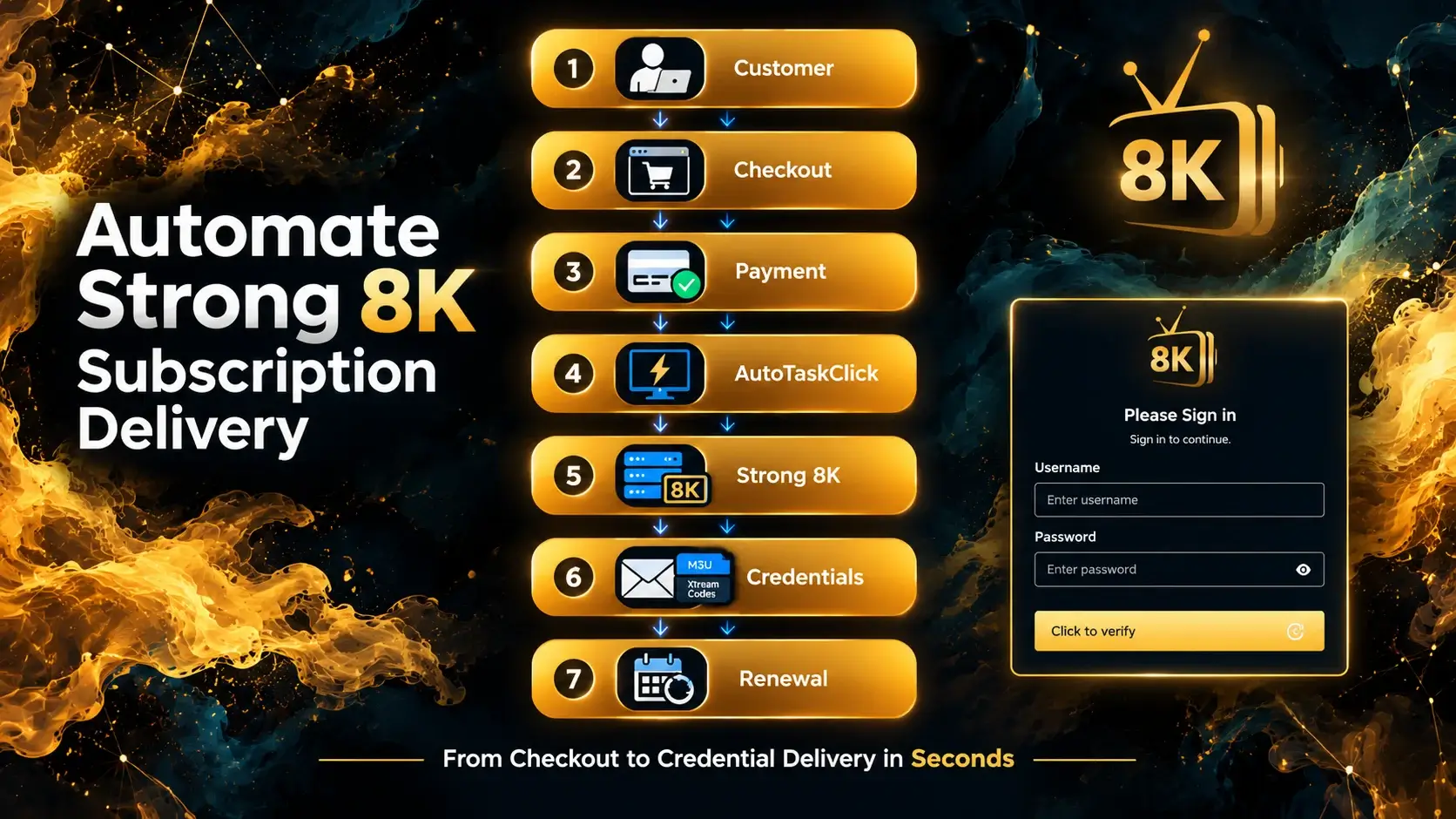
Customer → Checkout → Payment → Automation → Strong 8K → Subscription → Credentials → Customer
The key positioning statement: automation doesn't replace the Strong 8K panel. It connects the customer-facing order process to the panel so that repetitive operational steps can happen without manually processing every order. The panel still manages subscriptions; the automation layer manages the workflow around it.
8. How AutoTaskClick Automates Strong 8K Subscription Delivery
AutoTaskClick is an IPTV automation platform that connects the customer-facing order process to the Strong 8K panel. Here is how the integration works.
Connect Strong 8K to AutoTaskClick
The integration workflow connects your Strong 8K panel to AutoTaskClick using your panel credentials. No separate API integration is required — the platform works at the authentication layer.
Create Your Products and Plans
Configure your subscription plans, including duration, pricing, packages, and customer-facing descriptions. Each plan maps to a specific Strong 8K package and subscription period.
Connect Your Website or Checkout
Connect your website or checkout layer to AutoTaskClick. This can be a WordPress site, an HTML site, or a direct checkout link for customers who don't need a full website.
Connect Payment Methods
Configure the payment providers you want to accept. Payment provider availability is subject to region, account approval, and provider terms. AutoTaskClick supports multiple gateways including PayPal, Stripe, crypto, and high-risk merchant accounts.
Customer Places an Order
The customer selects a plan, pays, and the order is created in the system. No manual intervention is required at this stage.
AutoTaskClick Processes the Order
The system detects the payment confirmation and initiates the configured workflow. It communicates with the Strong 8K panel to create the subscription.
Strong 8K Subscription Is Created
The Strong 8K integration receives the subscription information and creates the customer account with the correct package and duration.
Customer Receives Credentials
The credentials — M3U playlist URL and Xtream Codes details — are delivered to the customer automatically through the configured delivery method.
Renewal Workflow
The customer can return to renew their subscription through the portal or checkout, rather than requiring the reseller to manually recreate the process. The system handles the renewal event and extends the subscription.
9. Strong 8K Manual vs. Automated Workflow
The difference between manual and automated Strong 8K operations is not just speed — it is what the reseller can scale.
| Step | Manual Strong 8K Workflow | Automated Workflow |
|---|---|---|
| Customer order | WhatsApp/manual | Website checkout |
| Payment | Manually checked | Connected payment workflow |
| Subscription | Manually created | Automated workflow |
| Credentials | Copy/paste | Automated delivery |
| Customer notification | Manual | Automated |
| Expiration | Manually tracked | Renewal workflow |
| Renewal | Manual conversation | Customer renewal flow |
| Scaling | More repetitive work | More automation |
The goal isn't to remove the Strong 8K panel. The goal is to remove unnecessary manual work around it. The panel manages subscriptions; the automation layer manages the workflow.
10. How to Set Up Strong 8K Automation With AutoTaskClick
Setting up Strong 8K automation with AutoTaskClick is a structured process. Follow these steps to configure the workflow.

Step 1 — Create Your AutoTaskClick Account
Register for an AutoTaskClick account. The registration process collects the basic information needed to configure your automation environment. You will have access to the dashboard where you configure panels, plans, checkout, and delivery.
Step 2 — Open the Panel Configuration
Navigate to the panel configuration section in your AutoTaskClick dashboard. This is where you select Strong 8K from the list of supported panels and begin the connection process.
Step 3 — Connect Strong 8K
Connect your Strong 8K panel to AutoTaskClick by providing the required configuration information. The integration is designed to work natively inside AutoTaskClick without requiring you to build a separate API integration.
Step 4 — Create Your Subscription Plans
Configure the subscription plans you want to offer. For each plan, specify:
- Duration. 1 month, 3 months, 6 months, or 12 months.
- Price. The customer-facing price for the plan.
- Package. The Strong 8K package or bouquet that maps to this plan.
- Product. The product name and description shown to customers.
- Customer-facing description. What the customer sees when selecting the plan.
Step 5 — Configure Your Checkout
Configure the checkout interface that customers will use to purchase subscriptions. This includes the checkout page, product selection, customer information collection, and payment method configuration.
Step 6 — Configure Customer Delivery
Configure how customers receive their credentials after purchase. The delivery method depends on the integration and your configuration. Common delivery methods include email delivery and access through a customer portal.
Step 7 — Place a Test Order
Run a complete test order to verify the workflow. Test the checkout, payment processing, Strong 8K subscription creation, credential generation, email delivery, and customer access.
Step 8 — Test the Subscription in a Player
Take the credentials from the test order and enter them into a compatible IPTV player. Verify that login works, live TV loads, VOD plays, EPG displays correctly, and playback is stable.
Step 9 — Activate the Workflow
Once the test order and credentials verification are successful, activate the workflow. The system will now handle orders automatically: customer → checkout → Strong 8K → delivery.
11. How to Automate Strong 8K Renewals
Renewals are the most valuable part of a subscription business because they represent recurring revenue. They are also the most operationally intensive when handled manually.
Why Renewals Become a Problem
In the manual workflow, every renewal requires the reseller to check the expiration date, message the customer, wait for payment, open the panel, renew the subscription, and send updated information. With 100 customers, this happens up to 100 times per month. With 500 customers, it happens 500 times per month.
Automated Renewal Workflow
↓
Customer reminder
↓
Customer renews
↓
Payment
↓
Subscription renewal
↓
Customer notification
The exact behavior depends on the configured AutoTaskClick workflow. The system can send reminder emails before expiration, process renewal payments, extend the subscription in the Strong 8K panel, and notify the customer — all without manual intervention.
12. Can AutoTaskClick Work With an Existing Strong 8K Reseller Setup?
Many resellers already have a Strong 8K panel and an established workflow. The question is whether adding automation requires rebuilding everything from scratch.
The answer: no. AutoTaskClick connects to your existing Strong 8K setup. You keep your existing panel, your existing customer base, and your existing plans. The automation layer is added on top of your existing operation.
What stays the same:
- Your Strong 8K panel and supplier relationship
- Your existing plans and pricing
- Your existing customer base
- Your existing website (if you have one)
What changes:
- Orders are processed automatically instead of manually
- Credentials are delivered automatically
- Renewals are tracked and managed automatically
- Customers gain self-service access
13. Strong 8K for Beginners vs. Existing IPTV Resellers
The starting point determines the priorities.
If You're Starting From Zero
You need the complete stack:
- Website or checkout page
- Checkout system
- Payment processing
- Strong 8K panel
- Automation platform (AutoTaskClick)
- Customer delivery system
- Support workflow
If You Already Sell Strong 8K
You may already have customers, a website, payment processing, and a Strong 8K panel. Your main opportunity is automating the repetitive work around the existing panel. The automation layer is added without disrupting the existing operation.
14. Strong 8K IPTV Panel Automation — What Should You Automate First?
Not all automation is equally valuable. Prioritize based on impact.
- Subscription creation. Highest priority. This is the most time-consuming manual task per order.
- Credential delivery. Remove the copy-paste step entirely.
- Payment-to-order processing. Reduce manual payment checking.
- Customer notifications. Automate order confirmations and delivery emails.
- Renewals. Reduce recurring manual work and recover missed renewals.
- Customer self-service. Let customers manage what can safely be self-managed.
- Analytics. Track orders, revenue, renewals, customers, and plans.
15. Common Strong 8K Automation Problems
Even with a well-configured setup, issues can occur. Here are the most common problems and how to address them.
Customer Paid but Subscription Was Not Created
Check the payment status, integration configuration, product mapping, and panel connection. The payment may have been received but the workflow may not have triggered correctly.
Credentials Were Not Delivered
Check the customer's email address, delivery settings, order status, and credential generation. The credentials may have been generated but the email delivery may have failed.
Strong 8K Subscription Has the Wrong Duration
Check the product configuration, plan mapping, and subscription duration. The plan mapping may not match the expected duration.
M3U or Xtream Codes Do Not Work
Check the credentials, URL, expiration date, and player compatibility. Verify that the credentials are correctly entered and that the player supports the format.
Customer Cannot Log In
Check the username, password, expiration date, and device/player. The account may have expired or the credentials may be incorrectly entered.
Renewal Did Not Update Correctly
Check the renewal order, subscription status, and panel synchronization. The renewal may not have been processed correctly.
16. How to Build a Small Strong 8K Reseller Business Without Building Software
The reseller doesn't need to develop a custom automation system from scratch. The business stack can be assembled from existing tools.
↓
Checkout
↓
Payment
↓
Strong 8K
↓
AutoTaskClick
↓
Customer portal
↓
Email delivery
This stack — an IPTV reseller software configuration — handles the entire workflow without requiring custom development. The reseller focuses on marketing and customer relationships while the systems handle the operational work.
17. Strong 8K + AutoTaskClick: Who Is This Setup For?
This setup works best for a specific profile. Being honest about fit improves conversion because it makes the recommendation more credible.
Good Fit
- Small reseller with 10–500 customers
- WordPress website or plans to build one
- Customers coming through WhatsApp, Telegram, or a website
- Wants a checkout system
- Wants automated fulfillment
- Doesn't want to write code
- Wants to scale repetitive operations
Less Suitable
- Wants to build everything from scratch
- Needs a completely custom proprietary platform
- Requires unsupported panel functionality
- Has technical requirements outside the current integration

18. Frequently Asked Questions About Strong 8K
Strong 8K is a high-tier IPTV server line and reseller panel provider. According to the current offering, it advertises 40,000+ live channels and 200,000+ movies and series from around the world, with APIs available for distributors to automate work[reference:16].
Strong 8K IPTV refers to the IPTV service and panel ecosystem. It is used by resellers to manage subscriptions and deliver content to end customers. The service supports M3U and Xtream Codes credentials compatible with major player applications[reference:17].
Yes. Strong 8K functions as a reseller panel — the software layer that lets resellers create customers, assign packages, set subscription durations, and generate credentials. It is used alongside a player application for end-user viewing.
Resellers use the Strong 8K panel to create and manage customer subscriptions. Customers access the service through M3U or Xtream Codes credentials entered into a compatible player application. The reseller handles subscription creation, credential delivery, and renewals.
Yes. Strong 8K is designed for distributors and resellers, with APIs available to automate work. Resellers can create subscriptions, assign packages, and deliver credentials to customers. The service supports 1, 3, 6, and 12-month subscription durations[reference:18].
The Strong 8K panel manages subscriptions and credentials — it is not necessarily a complete customer billing platform. Resellers typically use a separate system for customer invoices, such as WHMCS modules, manual PayPal invoices, or a custom checkout system[reference:19].
Log into the Strong 8K panel, create a new user, select the package or bouquet, set the subscription duration, and generate credentials. With automation, this process happens automatically when a customer completes checkout.
Credentials are typically delivered through WhatsApp, Telegram, or email. With automation, the system delivers them automatically — email delivery or customer portal access — within seconds of payment confirmation.
Yes. Automation platforms like AutoTaskClick connect the customer-facing order process to the Strong 8K panel. The system detects payment, creates the subscription, delivers credentials, and manages renewals automatically.
Yes. AutoTaskClick is an IPTV automation platform that supports Strong 8K natively. It connects the panel to a checkout system, automates subscription creation and credential delivery, and handles renewal workflows.
Yes. AutoTaskClick supports Strong 8K as a native panel integration. The platform also supports other panels including Kemo, MegaOTT, and AutoTask 8K, with custom integrations available on request.
An IPTV panel for resellers is the software layer that lets resellers create and manage customer subscriptions, assign packages, set durations, and generate credentials. Examples include Strong 8K, XUI, and Xtream UI.
Yes. AutoTaskClick integrates with WordPress and other website platforms. You can connect your WordPress checkout to the Strong 8K panel through the automation platform, creating a complete order-to-delivery workflow.
Yes. AutoTaskClick connects a WordPress checkout to the Strong 8K panel. When a customer completes a purchase, the system creates the subscription automatically and delivers credentials without manual intervention.
Yes. AutoTaskClick supports automated renewal workflows, including reminder emails before expiration and renewal options through the client portal. The system can automate suspension and reactivation based on renewal status.
No. AutoTaskClick provides the automation layer without requiring custom development. The platform connects to your existing Strong 8K panel and handles the workflow around it.
Strong 8K can be used by beginners, especially when combined with an automation platform that reduces the technical complexity of managing subscriptions. The learning curve depends on the specific setup and tools used.
Yes. AutoTaskClick connects to your existing Strong 8K panel without requiring you to rebuild your setup. You keep your existing panel, plans, and customer base, and add automation on top.
The system detects the payment confirmation, communicates with the Strong 8K panel to create the subscription, generates the credentials, and delivers them to the customer automatically — typically within 20 seconds.
Test the complete workflow: checkout, payment processing, Strong 8K subscription creation, credential generation, email delivery, and customer access. Verify that the credentials work in a compatible IPTV player before activating paid plans.
19. Conclusion — Strong 8K Is More Useful When the Workflow Around It Is Automated
The journey through this article covered four stages:
- What is Strong 8K? A panel and service used as part of the reseller operation.
- Why use it? For resellers who need a structured way to manage subscriptions and deliver content.
- What's the problem? The panel doesn't eliminate the manual work surrounding orders, payments, subscription creation, credential delivery, and renewals.
- What's the solution? Connect the Strong 8K workflow to automation.
↓
Website/Checkout
↓
Payment
↓
AutoTaskClick
↓
Strong 8K
↓
Subscription
↓
Credentials
↓
Customer
↓
Renewal
The Strong 8K panel remains essential — it manages subscriptions and delivers content. But the workflow around it is where the operational burden lives. Automation connects the customer-facing order process to the panel, removing the repetitive steps that limit growth.
Whether you're starting from zero or already selling Strong 8K subscriptions, the automation layer is what turns a manual operation into a scalable business.
Ready to Automate Your Strong 8K Subscription Delivery?
AutoTaskClick connects your Strong 8K panel to a fully automated order workflow. From checkout to credential delivery to renewals — without manual work. Start your free trial today.
Start Your Free Trial →