

An eager customer lands on your website, selects a subscription plan, and completes their checkout payment. Moments later, their phone rings or a WhatsApp notification pops up: “Where are my login details?”
If you are running your business manually, this moment triggers a frantic, multi-step race against time. You pause what you are doing, log into your payment gateway to verify that funds actually cleared, copy the transaction ID, log into your Kemo IPTV reseller dashboard, manually generate a new line with the requested connection limits, carefully copy the server URL, username, and password, and paste them into a message or email back to the customer.
Doing this once or twice a day is manageable. Doing it twenty times a day—especially during live sporting events or late at night—is an operational bottleneck that caps your growth, creates costly human errors, and frustrates paying subscribers.
The secret to scaling a successful IPTV reseller business lies in separating your subscription management from your customer workflow. While your panel handles line activation, your business requires an automated bridge to manage everything else: checkout validation, instant credential provisioning, automated delivery emails, and timely expiration reminders.
In this comprehensive guide, we will explore how Kemo IPTV operates for resellers, unpack the exact differences between provider panels like XUI.one and KYTV, expose the hidden costs of manual order processing, and demonstrate step-by-step how to build an automated subscription delivery engine using AutoTaskClick.
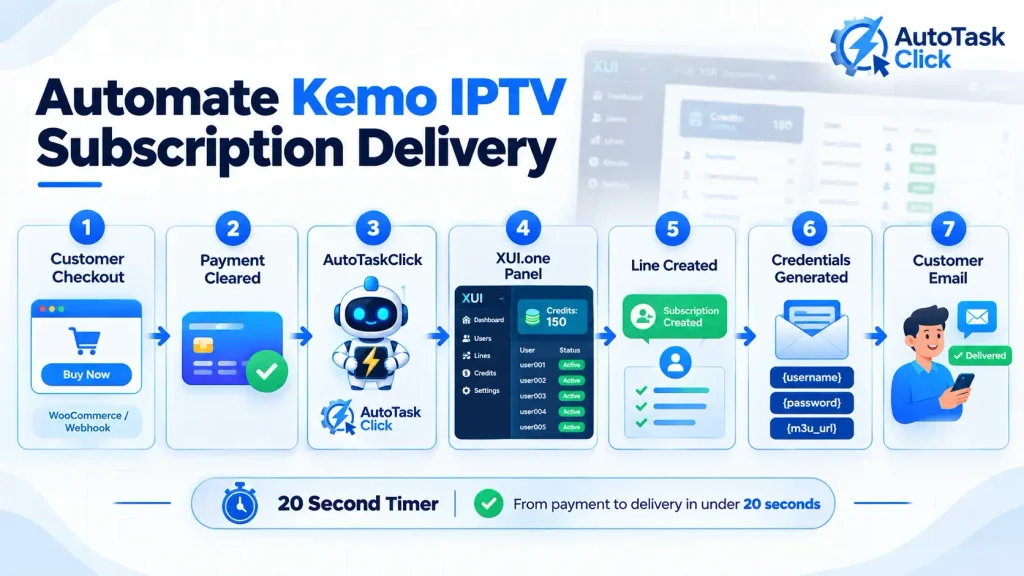
Figure 1: Automate Kemo IPTV subscription delivery — from customer checkout to credential delivery and renewal.
1. What Is Kemo IPTV?
Kemo IPTV (frequently searched as Kemo TV or Kemo IP TV) is a wholesale internet protocol television service that provides access to live television channels, sports broadcasts, and an extensive video-on-demand (VOD) library of movies and series delivered via internet protocol rather than traditional satellite or cable infrastructure.
In the broader streaming market, Kemo IPTV operates primarily through a decentralized reseller network. Instead of selling every subscription directly to end-users, the core service relies on independent resellers who handle retail marketing, customer support, localized billing, and user acquisition.
To understand how to build a business around Kemo IPTV, it is critical to separate the underlying streaming infrastructure from the management tools used to deliver it:
- The Streaming Infrastructure: The servers, load balancers, channels, VOD content, and middleware that stream data to compatible player apps like TiviMate, IPTV Smarters Pro, IBO Player, or XCIPTV.
- The Reseller Model: A wholesale credit-based system where resellers purchase credit packages upfront from top-level providers. These credits are then spent within a dedicated panel interface to activate, extend, or modify individual user subscriptions.
- The Management Interface: Software platforms such as XUI.one Panel or KYTV panel that allow resellers to manage line access, check expiration dates, and monitor active connections.
Many newcomers confuse the stream quality and catalogue size with the management software. A broad catalogue of listed channels or 4K streams describes the service offering; it does not solve the day-to-day challenge of fulfilling customer orders when payments clear on your retail website.
2. How Does Kemo IPTV Work for Resellers?
Operating as a Kemo IPTV reseller requires managing a distinct commercial lifecycle. Understanding each stage of this lifecycle helps you identify where human touch is valuable and where automated software should take over.
THE KEMO IPTV RESELLER LIFECYCLE
- Credit Acquisition → Reseller buys wholesale panel credits from provider.
- Retail Marketing → Reseller advertises plans on custom store/website.
- Order & Payment → Customer chooses plan and pays via retail checkout.
- Line Provisioning → Reseller spends panel credits to generate user line.
- Secure Delivery → Server URL, Username, and Password sent to customer.
- Renewal Lifecycle → Tracking expiry dates and collecting renewal payments.
The Credit-Based Economy
Unlike traditional affiliate programs that pay commissions on direct sales, a Kemo IPTV reseller operates as an independent retail vendor. You purchase wholesale credit packages from a main provider. For example, creating a 1-month single-connection line might cost 1 credit, while a 12-month subscription might cost 10 credits. Your profit margin is determined by the difference between your retail selling price and your wholesale credit cost.
Account Options and Limits
Within the reseller panel, you select specific account parameters when provisioning a line:
- Subscription Duration: Ranging from short-term trial accounts (e.g., 24 hours) to 1, 3, 6, 12, or 24-month terms.
- Simultaneous Connections: Determining how many devices or screens can stream simultaneously under a single account (e.g., 1 to 5 connections).
- Package Customization: Enabling or disabling specific channel categories, adult VOD, or international packages based on customer preferences.
The Fulfillment Gap
The fundamental challenge in this model is the manual gap between Stage 3 (Order & Payment) and Stage 4 (Line Provisioning). When a customer buys a subscription on your site, the provider’s panel does not natively know that a payment cleared on your Stripe, PayPal, or crypto checkout unless an automated system bridges the two environments.
3. Why Are Kemo IPTV Resellers Still Processing Orders Manually?
Despite the growth of modern e-commerce, a surprising number of Kemo IPTV resellers still process every single transaction manually. This habit usually starts during the early days of a business when order volume is low, but quickly becomes unsustainable as subscriber counts grow.
The Traps of Manual Order Fulfillment
- Context-Switching Overload: A manual reseller must constantly switch between their retail website, payment processor account, email inbox, messaging apps (WhatsApp/Telegram), and the Kemo IPTV reseller panel. Every tab switch increases the risk of copying the wrong credentials or missing an order.
- Delayed Delivery Times: If a customer orders a subscription while you are sleeping, driving, or away from your computer, they may wait hours for working access. In the digital streaming industry, long delivery delays directly trigger chargebacks, PayPal disputes, and negative online reviews.
- Typos and Credential Errors: Manually typing or copying complex strings of characters—such as server URLs, long usernames, or auto-generated passwords—frequently introduces trailing spaces or mistyped characters. This leads to immediate support tickets claiming “invalid credentials.”
- Inefficient Renewal Management: Tracking expiration dates on spreadsheets or manual calendar reminders guarantees that some customers will be cut off unexpectedly, while others might receive free access long after their term has expired.
- Burnout and Unscalable Operations: Handling repetitive administrative tasks prevents you from spending time on high-value business activities like driving search traffic, refining ad campaigns, and providing high-quality customer service.
4. What Is the Difference Between an IPTV Panel, a Billing System, and Automation Software?
To build an efficient online business, you must understand the three software pillars that power a professional automated reseller setup. Combining these three systems correctly creates a hands-off order processing pipeline.
THE THREE-PILLAR AUTOMATION STACK
[ 1. Checkout & Billing ] → [ 2. Automation Software ] → [ 3. IPTV Panel ]
- Checkout & Billing (e.g., paypal, Stripe, Crypto Gateways):
- Captures Customer Info
- Processes Payment
- Generates Order ID
- Automation Software (e.g., AutoTaskClick):
- Validates Payment Event
- Maps Order to Plan
- Triggers Line Creation
- Dispatches Email Details
- IPTV Panel (e.g., XUI.one, KYTV Panel):
- Deducts Credit
- Generates Line
- Stores URL/User/Pass
Pillar 1: The IPTV Panel (The Provisioning Engine)
The IPTV panel (such as XUI.one Panel or KYTV panel) is the administrative interface provided by your upstream Kemo IPTV supplier. Its sole purpose is line management: deducting credits, creating lines, setting connection limits, extending expiration dates, and generating M3U playlists or Xtream Codes login parameters. Crucially, an IPTV panel is not a marketing website or a customer checkout system.
Pillar 2: The Checkout & Billing System (The Storefront)
Your billing system—whether built on WordPress, custom e-commerce scripts, or specialized SaaS checkout tools—is where prospective customers browse your plans, select account durations, and submit payments. It holds customer contact details and transaction statuses but cannot natively generate Kemo IPTV login details.
Pillar 3: Automation Software (The Intelligent Bridge)
Automation software like AutoTaskClick acts as the central brain that connects your storefront to your provisioning engine. When a payment is confirmed by your billing system, AutoTaskClick listens for the event, verifies that the transaction is legitimate, communicates directly with the supported IPTV panel (no API required) to generate or extend the line, captures the generated credentials, and immediately dispatches a delivery email to the customer.
5. What Do People Say About Kemo IPTV on Reddit?
When researching prospective IPTV services or operational setups, community discussions on Reddit (across subreddits like r/IPTV, r/IPTVReviews, and r/IPTVReseller) offer valuable peer feedback. However, navigating Kemo IPTV Reddit discussions requires a critical, analytical mindset.
Evaluating Reddit Feedback Correctly
When analyzing Reddit threads regarding Kemo IPTV, keep the following evaluation rules in mind:
- Distinguish Stream Issues from Panel Issues: Many negative comments on Reddit stem from end-users experiencing local ISP throttling, bad Wi-Fi connections, or misconfigured player apps (such as improper buffering settings in TiviMate). Separate these end-user complaints from genuine reports about reseller panel uptime or credit handling.
- Check Post Timestamps: The IPTV landscape evolves rapidly. A Reddit review written two years ago regarding provider quality, credit prices, or panel features may be completely inaccurate today. Always filter discussions for recent feedback.
- Beware of Unverified Shilling and Smear Campaigns: Reddit contains both aggressive self-promotion by competing providers and malicious reviews designed to divert customers. Look for balanced discussions that share detailed setup parameters rather than emotional one-line claims.
- Verify Panel Specifics: Reddit threads often mention terms like “XUI panel” or “KYTV dashboard.” Use these community mentions to confirm which panel version an upstream provider uses, but always verify exact compatibility directly in your own setup documentation before investing heavily in credits.
You can explore the broader IPTV reseller community discussions on r/IPTV and r/IPTVReviews for real-world feedback.
6. What Should You Automate First in a Kemo IPTV Reseller Business?
If you are currently managing every part of your reseller business manually, trying to automate everything at once can feel overwhelming. The smartest approach is to automate high-frequency, low-complexity tasks first.
AUTOMATION PRIORITY MATRIX
High Impact ↑ [ 1. Payment-Triggered Provisioning ]
| [ 2. Instant Email Credential Delivery ] |
|---|
| [ 3. Automated Renewal Reminders ] |
| [ 4. Customer Self-Service Portal ] |
| Low Impact +—————————————-→ |
| Low Complexity High Complexity |
Priority 1: Payment-Triggered Line Creation
The most critical workflow to automate is the creation of new lines immediately following confirmed payments. Automating this eliminates the longest customer wait times and protects you from delivery delays during peak business hours or overnight.
Priority 2: Instant Credential Dispatch
Once a line is created in the panel, credentials must be delivered instantly to the customer’s checkout email. Automating email delivery ensures that server URLs, usernames, passwords, and M3U links are formatted cleanly with zero copying errors.
Priority 3: Renewal Reminder Notifications
Set up automated triggers to send friendly renewal reminders 7 days and 3 days before an account expires. This keeps subscription retention high without requiring you to manually check expiration calendars every morning.
7. What Is Kemo IPTV Subscription Automation?
Kemo IPTV subscription automation refers to the end-to-end digital architecture that processes a retail order, verifies payment, provisions the subscription line in the reseller panel, delivers login credentials to the buyer, and tracks account renewals without human intervention.
The Ideal Automated Order Journey
- Checkout Submission: A customer selects a 12-Month / 1-Device plan on your e-commerce store and submits their details.
- Payment Clearance: Your payment gateway (e.g., Stripe or a crypto payment processor) processes the transaction and fires a secure payment confirmation event.
- Workflow Orchestration: AutoTaskClick receives the payment event, checks the order reference, and confirms that the paid item matches the 12-Month product configuration.
- Panel Execution: AutoTaskClick calls the supported Kemo IPTV reseller panel, executing the line creation command and deducting the corresponding credits from your reseller balance.
- Credential Capture & Parsing: The panel responds with the newly generated account credentials (Server URL, Username, Password, and M3U URL).
- Automated Email Delivery: AutoTaskClick populates a pre-designed email template with the customer’s exact login details and player setup guides, sending it instantly to the customer’s checkout email address.
- Order Logging & Status Update: The retail order status is automatically updated to “Completed,” and the expiration date is logged for future renewal tracking.
8. How AutoTaskClick Helps Automate Kemo IPTV Subscription Delivery
AutoTaskClick is built specifically to serve as the bridge between modern e-commerce checkouts and specialized reseller management panels. Instead of requiring you to write custom code or build fragile browser scripts, AutoTaskClick provides a structured, visual environment to map your online products directly to panel commands.
AUTOTASKCLICK WORKFLOW MATRIX
E-COMMERCE CHECKOUT → AUTOTASKCLICK ENGINE → SUPPORTED RESELLER PANEL
Key Operational Capabilities
- Direct Panel Integration: AutoTaskClick connects natively to supported IPTV reseller panels (including XUI.one Panel and compatible KYTV panel systems), ensuring stable, high-speed line creation without manual intervention.
- Flexible Product Mapping: Map any product SKU or duration from your store (1 Month, 3 Months, 1 Year, multi-connection options) to its exact counterpart in your reseller panel.
- Payment Guard Validation: To prevent fraudulent line creation, AutoTaskClick requires verified payment webhook signals before executing panel commands.
- Automated Retry Logic: If a temporary network glitch occurs during line creation, AutoTaskClick logs the exception and retries the action safely, preventing dropped orders.
- Centralized Order Logging: Maintain an audit trail of every transaction, showing the original payment reference, the created panel username, and email delivery timestamps in one organized dashboard.
Explore the full AutoTaskClick feature set and pricing plans to see which tier fits your order volume.
9. Manual Kemo IPTV Delivery vs. an Automated Workflow
Comparing the two operating models side-by-side demonstrates why automating subscription delivery is essential for growing your business.
| Operational Criteria | Manual Order Processing | Automated Workflow with AutoTaskClick |
|---|---|---|
| Average Delivery Speed | 15 minutes to 8+ hours (depends on reseller availability) | Under 30 seconds (24/7/365 instant delivery) |
| Human Error Rate | High (risk of mistyped passwords, wrong plans, or missed emails) | Zero formatting errors (credentials parsed directly from panel) |
| Overnight Fulfillment | Impossible without missing sleep or hiring night-shift staff | Fully autonomous overnight order handling |
| Scaling Capacity | Capped at ~20-30 orders per day before administrative fatigue | Handles hundreds of concurrent orders effortlessly |
| Renewal Retention | Low (dependent on manual spreadsheet checks) | High (automated expiration tracking and reminder emails) |
| Customer Satisfaction | Inconsistent (leads to frequent “where are my details?” tickets) | High (instant gratification with clear setup instructions) |
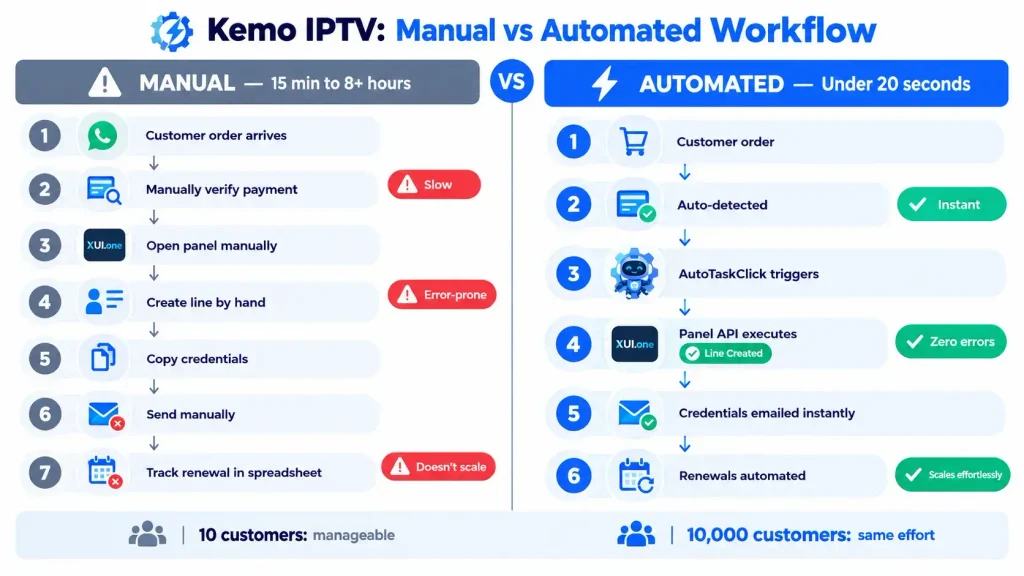
Figure 2: Manual vs automated Kemo IPTV workflow — the difference is what you can scale.
10. How to Set Up Kemo IPTV Subscription Automation With AutoTaskClick
Setting up your automated delivery pipeline requires configuring your storefront, linking your reseller panel, and mapping your product lines. Follow this practical, step-by-step setup tutorial.
Step 1: Verify Panel Access
Before configuring software, log into your Kemo IPTV reseller dashboard (XUI.one or KYTV panel) and obtain your administrative credentials:
- Locate your reseller panel URL (e.g.,
https://panel.yourproviderserver.com). - Confirm your reseller username and password.
- Ensure your account has sufficient panel credits and permissions to create and extend lines.
Step 2: Connect Your Storefront to AutoTaskClick
Navigate to your AutoTaskClick dashboard and set up your store integration:
- Go to settings > Generate embed token. Create the token that allows the checkout to be embedded on your website.
- Download and install the plugin
- Copy checkout link. copy a direct checkout link for customers who do not need a full website.
- You can also Embedded checkout forms — add a WordPress page and integrate with the shortcode HTML script.
Step 3: Configure the Kemo IPTV Panel Connection
In AutoTaskClick, establish the link to your reseller panel:
- Select Panel Integrations > Add New Panel.
- Choose the panel type (e.g., KemoIPTV or Strong8K).
- Enter your Panel Base URL, Reseller Username, and Reseller Password.
- Click Test Connection to verify that AutoTaskClick can communicate with your panel.
AUTOTASKCLICK DASHBOARD: PANEL CONFIGURATION
Panel Type: [ XUI.one Panel ]
Panel URL: [ https://ky-panel.net ]
Username: [ reseller_demo ]
Password: [ ****************** ]
[ TEST CONNECTION ] → Result: Connection Successful (Balance: 150 Credits)
Step 4: Map Your Store Products to Panel Parameters
Link each item on your website to its corresponding panel settings:
- Navigate to Product Mapping > Create Rule.
- Select your store’s product SKU (e.g.,
KEMO-1MONTH-1DEV). - Map it to the panel parameters: Set Duration =
1 Month, Connections =1. - Specify trial vs. official line rules and select default channel package packages.
Step 5: Design the Automated Email Delivery Template
Configure the notification sent to subscribers upon successful line creation:
- Go to Email Templates > Custom Delivery Template.
- Include dynamic merge tags for customer parameters:
{customer_name}{server_url}{username}{password}{m3u_url}{expiration_date}
- Add links to player setup documentation (such as TiviMate setup guides).
SAMPLE AUTOMATED DELIVERY EMAIL TEMPLATE
Subject: Your Subscription Details – Order #{order_id}
Hello {customer_name},
Thank you for your purchase! Your account is active and ready to use.
Account Credentials:
- Server URL: {server_url}
- Username: {username}
- Password: {password}
- M3U Link: {m3u_url}
- Expiry: {expiration_date}
Setup Guides: https://yourdomain.com/setup-help
Step 6: Perform a Test Order Verification
Before making your automated pipeline live:
- Create a test product on your storefront priced at $0.00 or run a test mode transaction.
- Complete checkout using a test email address.
- Monitor the AutoTaskClick activity log to confirm:
- Payment webhook was received successfully.
- Panel executed and deducted credits correctly.
- Credentials were parsed and sent to the test email address.
- The generated account appears in your panel dashboard with the correct expiry date.
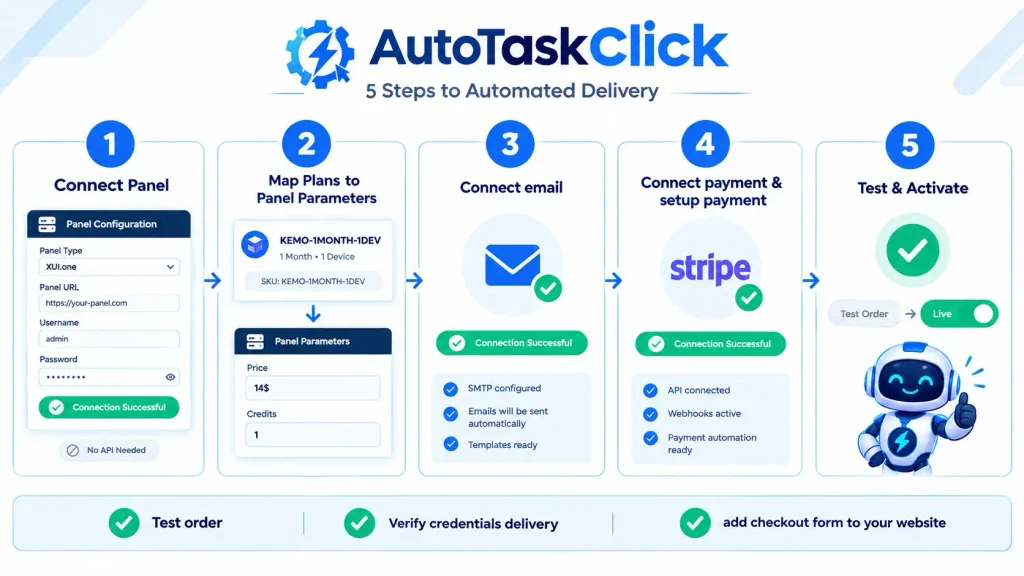
Figure 3: Kemo IPTV automation setup — connect the panel, create plans, configure checkout, test, and activate.
11. How to Manage Kemo IPTV Renewals Automatically
Acquiring a new customer is only half the battle; maintaining long-term profitability requires high subscriber retention. Automated renewal handling turns one-time purchasers into predictable monthly or annual recurring revenue.
AUTOMATED RENEWAL LIFECYCLE MATRIX
- EXPIRATION MONITORING → AutoTaskClick tracks active line end-dates.
- EARLY REMINDER (T-7) → Automated email sent with 1-click renewal link.
- FINAL NOTICE (T-1) → Urgent expiry notice sent before line disconnection.
- RENEWAL CHECKOUT → Customer completes renewal payment online.
- EXTENSION CALL → Line extended in panel WITHOUT changing login pass.
- CONFIRMATION DISPATCH → Email confirms new expiration date to customer.
Handling Customer-Initiated Extensions Smoothly
When an existing subscriber purchases a renewal on your storefront, your automation system must recognize that they are extending an existing account rather than creating a brand-new line.
- Identifier Matching: The renewal checkout asks the customer for their existing account username or registered email address.
- Line Extension Execution: AutoTaskClick calls the panel’s extension endpoint (e.g.,
extend_line) rather thancreate_line. - Preserving Credentials: The user’s server URL, username, and password remain completely unchanged. Their subscription end-date is simply pushed forward in the panel, eliminating the need for them to re-configure their streaming devices or player apps.
12. Can You Automate an Existing Kemo IPTV Reseller Setup?
If you already manage dozens or hundreds of active subscribers manually, you do not need to tear down your business and start from scratch to adopt automation. You can transition an existing operation smoothly without interrupting your customers’ access.
Transition Checklist for Existing Resellers
- Audit Active Subscribers: Export a complete list of your current active lines from your reseller panel, including usernames, expiration dates, and assigned plans.
- Verify Panel Access: Ensure that your current upstream supplier provides full access or credentials compatible with standard panel integrations.
- Standardize Retail Product SKUs: Update your e-commerce product listings so that product names and SKUs explicitly reflect connection counts and plan durations.
- Map Existing Accounts for Renewals: Import your current subscriber usernames into your billing database or AutoTaskClick mapping profiles so future renewal checkouts extend existing lines correctly.
- Phased Rollout: Enable automation for all incoming new customer purchases first. Once new order delivery is running smoothly, enable automated renewal workflows for existing customers as their current terms expire.
13. Starting an IPTV Reseller Business vs. Automating an Existing One
Your operational strategy will differ depending on whether you are launching a brand-new storefront or optimizing an existing reseller business.
STARTING NEW VS. AUTOMATING EXISTING
| ASPECT | NEW RESELLER BUSINESS | EXISTING RESELLER BUSINESS |
|---|---|---|
| Primary Focus | Storefront setup, credit | Bottleneck reduction, churn |
| acquisition, initial marketing | prevention, scaling | |
| Automation Goal | Build hands-off operations | Eliminate manual labor, |
| from Day 1 | migrate existing subscriber | |
| data cleanly | ||
| Panel Setup | Small credit package, | Established balance, |
| initial API key setup | existing line management | |
| Key Risk | Low traffic/sales | Customer disruption during |
| operational migration |
Path A: Starting a New Business
If you are starting an IPTV reseller business from scratch, build an automated workflow from Day 1. Setting up your storefront with AutoTaskClick before acquiring your first customer ensures that your business model is scalable from the very first sale, preventing operational headaches later on.
Path B: Automating an Existing Business
If you already manage a large subscriber base manually, focus on operational efficiency. Automating order delivery frees up hours of daily administrative work, giving you the time needed to improve customer support, optimize search rankings, and expand your marketing campaigns.
14. Kemo IPTV, KYTV Panel, and XUI.one: What Should Resellers Know?
The terminology surrounding Kemo IPTV reseller infrastructure can often be confusing for newcomers. It is important to clarify the exact relationships between service brands, reseller interfaces, and panel software.
IPTV INFRASTRUCTURE TERMINOLOGY BREAKDOWN
SERVICE BRAND (e.g., Kemo IPTV)
↓
RESELLER BRAND / DISTRIBUTOR (e.g., KYTV Management)
↓
PANEL SOFTWARE (e.g., XUI.one Architecture)
- Kemo IPTV / Kemo TV: The consumer-facing content brand and streaming service infrastructure.
- KYTV Panel: A specific reseller management portal branding frequently associated with Kemo IPTV credit distribution networks.
- XUI.one Panel: A widely used panel architecture that provides the underlying database structure, line management, and API endpoints for reseller operations.
Understanding these technical distinctions ensures that when you connect software like AutoTaskClick, you select the correct underlying API protocol (such as XUI.one API parameters) regardless of the custom logo displayed at your reseller panel’s login screen.
15. Common Problems With Automated Subscription Delivery
Even the best automated workflows can encounter operational friction. Knowing how to diagnose and resolve common integration issues keeps your fulfillment engine running smoothly.
Troubleshooting Checklist
AUTOMATION TROUBLESHOOTING GUIDE
| ISSUE | PROBABLE CAUSE | RESOLUTION |
|---|---|---|
| Payment succeeds, but no line is generated. | Webhook URL misconfigured or payment on hold. | Re-copy Webhook URL from AutoTaskClick into gateway settings. |
| Panel returns “Insufficient Credits” error. | Reseller account ran out of panel credits. | Top up credit balance with upstream supplier. |
| Customer reports email not received. | Email landed in Spam or address mistyped. | Configure SMTP domain authentication (DKIM/SPF records). |
| Panel connection fails during testing. | Panel URL changed or access disabled. | Verify panel URL and re-check credentials. |
If you need help diagnosing a specific integration issue, reach out via AutoTaskClick’s support channel.
16. How to Build a Small IPTV Reseller Business Without Building Your Own Software
Many ambitious resellers make the mistake of trying to write custom integration scripts or hiring expensive freelance developers to build custom software. This approach is costly, time-consuming, and difficult to maintain when panel or payment gateways update their code.
THE MODERN RESELLER SOFTWARE STACK
- STORE FRONT ENGINE: WordPress, Shopify, or Custom Web Page
- PAYMENT HANDLING: Stripe, PayPal, Crypto Gateways (e.g., NOWPayments)
- AUTOMATION BRIDGE: AutoTaskClick (Workflow Coordination Engine)
- RESELLER PANEL: Kemo IPTV / XUI.one / KYTV Reseller Dashboard
- CUSTOMER COMMUNICATION: Automated SMTP Email Delivery (e.g., SendGrid/Mailgun)
By leveraging established tools like WordPress for your storefront, standard payment gateways for checkout processing, AutoTaskClick for automation, and your provider’s reseller panel for line management, you build a robust, professional business stack without writing a single line of custom code.
For more background on how this works, read the full guide on how to automate an IPTV business.
17. Is Kemo IPTV Automation Right for Your Business?
While subscription automation provides clear competitive advantages, evaluating whether it fits your current operational scale is an important business decision.
Automation Is Ideal If:
- You process more than 3-5 orders per day and spend valuable time manually copying credentials.
- You want to offer true 24/7 instant order fulfillment to global customers across different time zones.
- You experience delivery errors, mistyped credentials, or delayed setup complaints.
- You plan to run marketing campaigns to scale your subscriber count without increasing your administrative workload.
Automation May Be Premature If:
- You only provide lines to a handful of close friends or personal contacts where manual management is preferred.
- Your upstream provider does not permit API line creation or third-party workflow integrations.
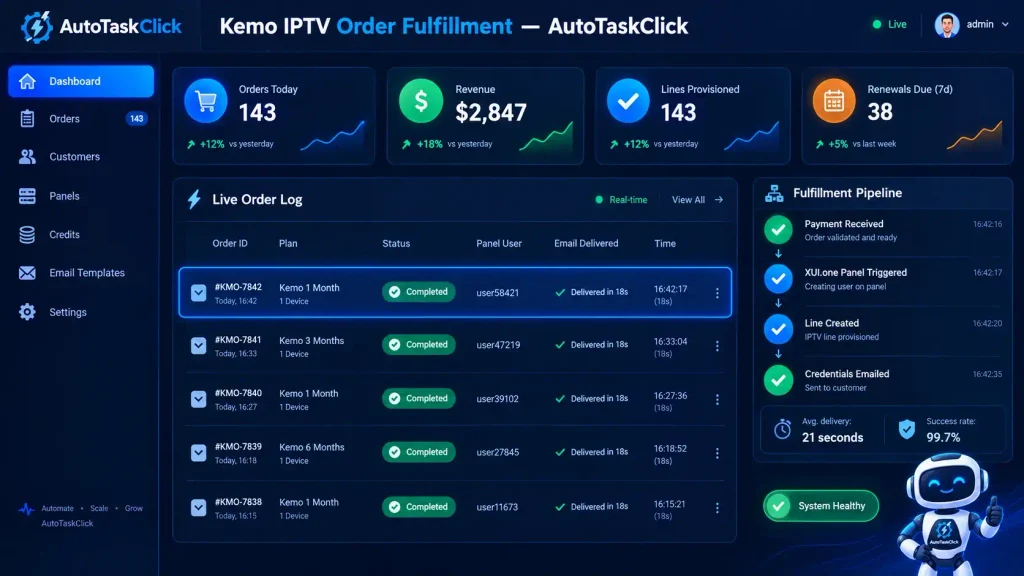
Figure 4: Kemo IPTV order fulfillment — from checkout to credential delivery in seconds.
18. Frequently Asked Questions About Kemo IPTV and Automation
1. What is Kemo IPTV?
Kemo IPTV is an internet protocol television service delivering live channels, sports streams, and on-demand video content over internet connections using streaming applications.
2. Is Kemo IPTV suitable for resellers?
Yes, Kemo IPTV offers credit-based reseller programs that allow independent vendors to purchase wholesale credits, manage user lines, and build their own subscriber businesses.
3. How does a Kemo IPTV reseller panel work?
A reseller panel allows you to spend wholesale credits to create, extend, modify, or disable user lines, adjust connection limits, and monitor expiration dates.
4. What is the difference between Kemo IPTV and an IPTV panel?
Kemo IPTV is the streaming service infrastructure, while an IPTV panel is the administrative management software used to manage subscriber lines and credits.
5. Is Kemo IPTV related to XUI.one Panel?
XUI.one Panel is a popular panel software architecture. Many Kemo IPTV reseller portals build their administrative management dashboards on XUI.one framework.
6. Can Kemo IPTV subscriptions be delivered automatically?
Yes, by connecting your e-commerce storefront checkout to a supported automation tool like AutoTaskClick, line creation and credential delivery can be fully automated.
7. Does AutoTaskClick support Kemo IPTV?
AutoTaskClick supports panel connections (even without API) utilized by Kemo IPTV reseller portals (including XUI.one and compatible KYTV systems). Always verify panel compatibility during setup.
8. Can I connect an IPTV panel to a WordPress?
Yes, by installing autotaskclick plugin, sending payment completion webhooks from WordPress to AutoTaskClick, successful checkouts directly trigger line provisioning in your reseller panel.
9. Can subscription renewals be automated?
Yes, AutoTaskClick can process extension commands for existing usernames upon confirmed renewal checkouts, extending lines in the panel without changing login passwords.
10. What happens if payment succeeds but a subscription is not created?
If an issue occurs (such as low panel credits), AutoTaskClick logs the exception, notifies you in your dashboard, and holds the order for safe retry or manual review.
11. What should I look for in Kemo IPTV Reddit discussions?
Look for recent feedback regarding panel stability, credit policies, and setup experiences while ignoring unverified promotion or outdated technical claims.
12. What software do I need to start an IPTV reseller business?
You need an e-commerce storefront (e.g., wordpress), a payment gateway, an authorized reseller panel account with credits, and automation software like AutoTaskClick.
19. Conclusion: Make Kemo IPTV Subscription Delivery Easier
Managing a successful Kemo IPTV reseller business should not mean spending your days copying credentials, checking payment logs, and responding to “where are my login details?” emails.
By understanding the distinct roles of your storefront checkout, your reseller panel, and automation software, you can eliminate manual bottlenecks and build a scalable subscription business. An automated delivery engine powered by AutoTaskClick delivers instant credentials to your buyers, keeps customer satisfaction high, and ensures that your operations run smoothly 24 hours a day, 7 days a week.
Ready to Simplify Your Reseller Operations?
Stop creating every Kemo IPTV subscription manually. Connect your website, checkout, and reseller panel into one organized, automated workflow today.
- Explore the AutoTaskClick Platform
- Review Setup & Integration Documentation
- Get Started with AutoTaskClick
About This Article
This guide was prepared as an educational resource for IPTV resellers exploring subscription automation. Kemo IPTV is a third-party service; AutoTaskClick is an independent automation platform that connects supported reseller panels to e-commerce checkouts. Always verify that your content distribution and reseller operations comply with the laws and licensing requirements of your target market.