
📌 TL;DR
- An IPTV API lets your billing system talk to your panel automatically—creating accounts, renewals, and suspensions without manual work.
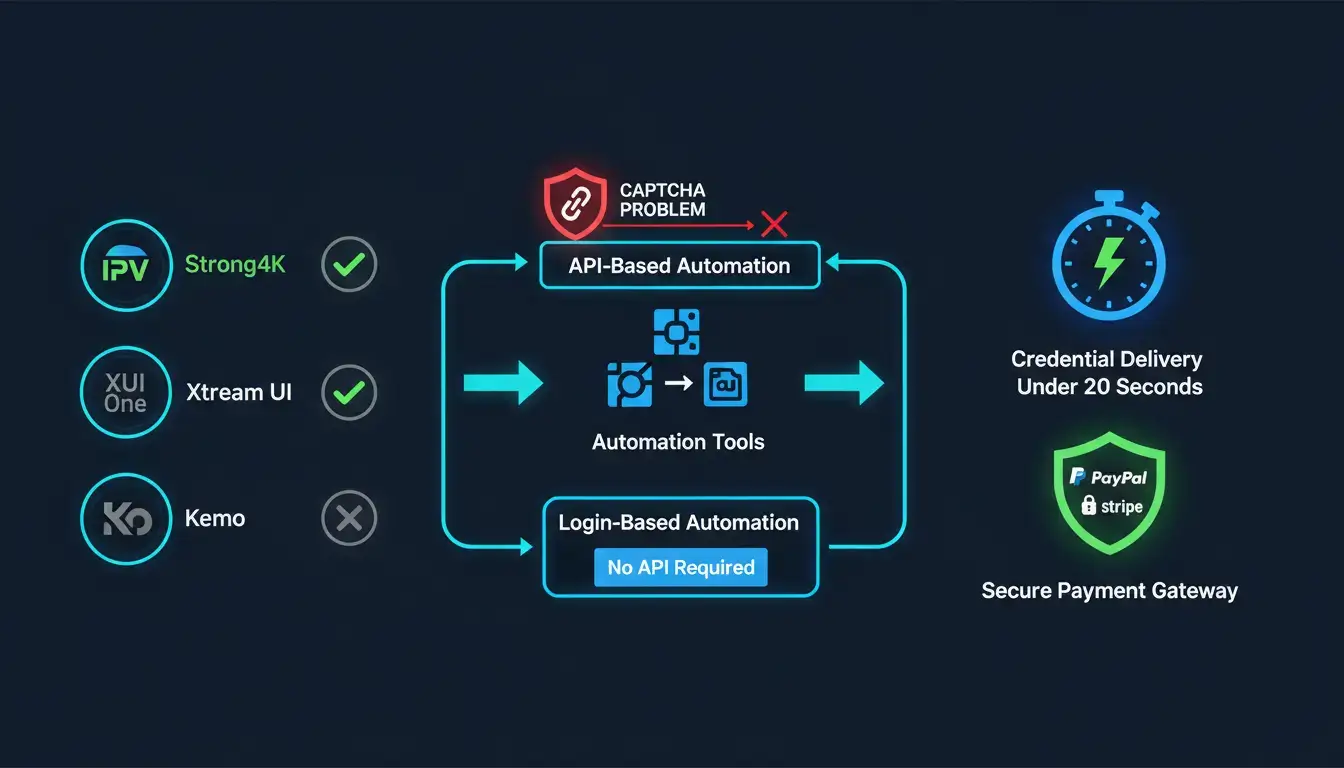
- Strong4K, Strong8K, XUI One, and Xtream Codes-based panels offer API access. Kemo does not.
- API connections don't solve payment gateway bans, captcha-protected logins, or the need for ongoing maintenance.
- Autotaskclick automates panels even without an API—including those behind captchas—delivering credentials in under 20 seconds.
- First 20 orders free for new resellers—no API required.
Compare IPTV API providers and discover how to automate any panel—even without an API.
If you sell IPTV subscriptions, you've heard the term thrown around in every reseller group: IPTV API. Everyone wants one. Some think it's the missing piece that turns a manual, exhausting business into a real automated operation. Others already have one and are trying to build something with it, whether that's a custom checkout, a WHMCS module, or their own delivery script.
Here's the truth: an IPTV API is genuinely useful, but it's not the only path to automation, and it's not available on every panel. Before you spend weeks chasing API documentation or paying a developer to build against one, you need to know which iptv panel providers actually give you API access, what that access lets you do, and where it falls short.
This guide breaks down the panels that offer an iptv-api, what resellers actually automate with it, and the setup that lets you skip the API requirement altogether.
📖 Table of Contents
What an IPTV API actually does
An IPTV API is a set of requests that let one piece of software talk to your panel automatically, without a human clicking buttons. In general terms, an API is simply a defined way for two systems to exchange data and trigger actions, and an IPTV panel's API applies that same idea to account creation. Instead of you logging into the panel and creating a line by hand, your billing system or automation tool sends a request with the customer's plan and details, and the panel creates the account and sends back a confirmation.
This is different from an iptv m3u playlist, which is just a link the end customer's app uses to pull channels and content. The playlist is the output for the viewer. The API is the backend connection that creates, renews, or manages the accounts generating those playlists in the first place.
It's also different from an iptv login, which is simply the username and password (or portal URL) a reseller or sub-reseller uses to access their panel manually. You can have a panel login without ever touching its API, and plenty of resellers do exactly that, for years, one order at a time.
IPTV panel providers that offer API access
A handful of panels have built a real API layer that automation tools and developers can connect to. Here are the ones worth knowing.
Strong4K and Strong8K. These panels support Xtream Codes and M3U-based API connections, letting resellers generate and activate lines programmatically instead of doing it manually inside the dashboard. Strong4K is one of the more commonly automated panels because of how widely it's already used across reseller networks.
XUI One. XUI One runs a REST-style Admin API that has become close to a standard for WHMCS-based IPTV billing setups. It supports account creation, bouquet assignment, renewals, and suspension through API calls, which is why so many billing modules are built specifically around it.
T-Rex. T-Rex is a newer panel gaining traction with resellers, and API support is actively being built out by automation providers to bring it in line with what Strong4K and XUI One already offer.
Generic Xtream Codes and Xtream UI panels. Many smaller or white-labeled panels run on top of the Xtream Codes API framework, which means they inherit a similar structure. If your panel is Xtream-based, there's a decent chance an API connection exists, even if it's not heavily documented.
Not every panel makes this list. Kemo IPTV, for example, is a popular choice among resellers, but it does not expose an API for outside automation tools to connect to. If your panel isn't on this list, don't assume you're stuck. Keep reading.
What resellers actually automate with the API
The appeal of an IPTV API isn't the technology itself. It's what it removes from your day. Resellers who connect their panel to an automation system typically use that connection to:
- Deliver credentials the moment a payment clears—instead of manually creating an account and emailing it out.
- Manage iptv channels and bouquets for each customer without opening the panel for every request.
- Handle renewals automatically—extending the account when payment comes in and suspending it when it doesn't.
- Pull usage and expiry data to know exactly which customers are active, expiring, or churned.
10 manual account creations a day is manageable. 60 is not. This is the exact wall most resellers hit before they start looking for an API in the first place.
The catch with API-only automation
Here's where most resellers get stuck. An API connection sounds simple until you're the one building or maintaining it.
First, not every panel has one. If your panel isn't Xtream-based, XUI One, or Strong4K, you may be out of luck, or stuck waiting for a developer to reverse-engineer something that was never meant to be public.
Second, API access alone doesn't protect you from the other half of the automation problem: payment gateways. PayPal's own acceptable use policy and Stripe both give them room to limit or ban IPTV-related accounts, and an API connection to your panel does nothing to stop that. We cover how to reduce that risk in our guide on accepting PayPal for IPTV without getting banned.
Third, and this is the one most automation tools won't tell you about upfront: some panels sit behind a captcha on their login page. A captcha breaks almost every API-only or script-based automation tool cold, because there's no clean request to send. The tool either can't log in at all, or it needs constant manual intervention to get past the captcha check, which defeats the entire point of automating in the first place.
Why an API isn't actually a requirement
This is the part most guides skip. You don't need your panel to have an API at all to automate your IPTV reselling business.
Autotaskclick does not require an API from your panel to set up full automation. You add your panel login information—the same iptv login credentials you already use to access your dashboard—and Autotaskclick handles order delivery, renewals, and customer management from there. No API key, no developer, no documentation hunt.
This matters most for the captcha problem above. Autotaskclick can link to a panel even when that panel's login is protected by a captcha, something that stops most API-dependent or script-based tools outright. If you've been told your panel "can't be automated" because it lacks an API or sits behind extra login protection, that's usually not true. It just needs a different approach than a raw API connection.
This is also why Autotaskclick already supports Xtream UI, XUI One, Kemo, Strong, and others, with new panels like T-Rex being added as they come up. The panel doesn't need to expose anything special. It just needs a login.
On top of the panel connection, Autotaskclick delivers credentials within 20 seconds of payment, protects your PayPal and Stripe accounts from bans with a dedicated redirection and product-mapping layer, and sends automated renewal reminders to boost how many customers actually come back. Resellers using it have cut manual work by up to 70%, freeing up hours a day that used to go into copy-pasting credentials and chasing renewals by hand. You can see the full feature list here.
Choosing your setup: a quick checklist
Before you commit to an API-first automation build, run through this:
- Confirm your panel actually has a documented API. Don't assume, check.
- Confirm the panel's login isn't behind a captcha your automation tool can't handle.
- Decide whether you want to maintain custom API code yourself or use a tool that doesn't require one at all.
- Check that your payment gateway protection is handled separately from your panel connection, since an API alone won't stop gateway bans.
- Compare panels directly if you haven't settled on one. Our reseller panel comparison breaks down the major options side by side.
FAQ
Does every IPTV panel have an API?
No. Strong4K, Strong8K, XUI One, and most Xtream Codes-based panels do. Others, including Kemo, do not expose one for outside automation tools.
Can I automate a panel that doesn't have an API?
Yes. Autotaskclick connects using your panel login information instead of an API, which means panels without a public API can still be fully automated.
What if my panel login is protected by a captcha?
This is exactly where most API-based or script-based automation tools fail. Autotaskclick is built to link to panels even when a captcha sits in front of the login.
Is "ipeteve" the same as IPTV?
It's a common misspelling of IPTV that shows up in searches. The technology, panels, and automation options are the same regardless of how it's typed.
The bottom line
An IPTV API is a useful tool if your panel offers one and you're ready to build or pay for the integration. But it was never the actual requirement for automation. What you need is a system that connects to whatever panel you're already using, API or not, captcha or not, and handles delivery, renewals, and payment protection without you touching a single line of code.
That's the setup Autotaskclick was built around. If you're tired of manually creating accounts every time a payment lands, start with the free trial and get your first 20 orders automated at no cost.
❓ Frequently Asked Questions
Does every IPTV panel have an API?
No. Strong4K, Strong8K, XUI One, and most Xtream Codes-based panels do. Others, including Kemo, do not expose one for outside automation tools.
Can I automate a panel that doesn't have an API?
Yes. Autotaskclick connects using your panel login information instead of an API, which means panels without a public API can still be fully automated.
What if my panel login is protected by a captcha?
This is exactly where most API-based or script-based automation tools fail. Autotaskclick is built to link to panels even when a captcha sits in front of the login.
What IPTV panels does Autotaskclick support?
Autotaskclick supports Xtream UI, XUI One, Kemo, Strong, and others, with new panels like T-Rex being added as they come up. The panel doesn't need to expose anything special—just a login.
How much does Autotaskclick cost?
Autotaskclick starts with 20 free orders, then charges $0.55 per order for the first 100 orders, $0.45 for 100–500 orders, and $0.35 for 500+ orders. No monthly fees or setup costs.