Last updated: September 2026 · Reading time: 22 min · Expert level: Beginner to Advanced
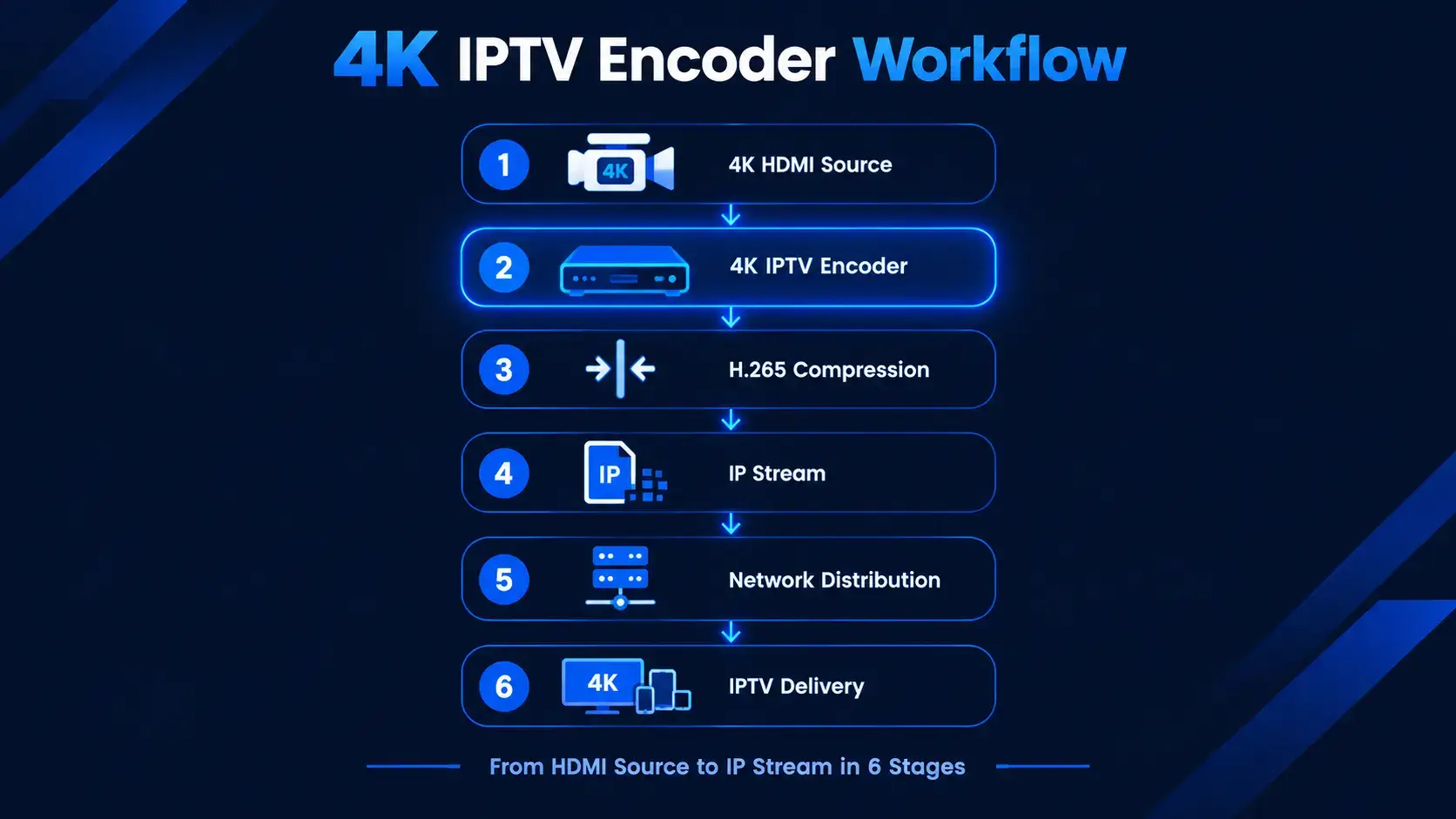
Every IPTV stream begins somewhere. Before the customer opens their player, before the subscription is activated, before the payment clears — there is a raw video signal that needs to be compressed, packaged, and pushed across a network. That first step happens inside a 4K IPTV encoder.
Most resellers will never operate an encoder themselves. They buy streams from upstream providers, package them into subscriptions, and focus on customer acquisition. But understanding how encoding works — and what it means for bandwidth, quality, and device compatibility — helps resellers evaluate their supply chain, price their plans accurately, and troubleshoot issues when they arise.
This guide explains what a 4K IPTV encoder does, how it works, and where it fits into the broader IPTV business workflow. We'll cover codecs, input types, protocols, latency, and the operational layer that most technical guides ignore: how streams become subscriptions.
A 4K IPTV encoder is a hardware device — or in some cases, a software application — that takes a raw, uncompressed video and audio signal and converts it into a compressed digital format suitable for delivery over an IP network. Without compression, a single uncompressed 4K video stream would require hundreds of gigabits per second of bandwidth to transmit, making live delivery over any practical network impossible. For comparison, a single uncompressed 1080p60 feed consumes roughly 3 Gbps — far too large to stream live over any internet connection[reference:0].
The encoder sits at the origin of every IPTV signal chain. Its codec choice, input quality, latency performance, and thermal stability directly determine the ceiling of stream quality that downstream viewers can receive — regardless of how capable the player applications or streaming devices on the receiving end may be[reference:1].
Encoding is the process of reducing the size of a video signal without losing perceptual quality. It works by analyzing each frame, identifying redundant information, and storing only what changes. A static scene requires far less data than a fast-moving sports sequence. The encoder makes these decisions in real time, thousands of times per second.
The output is a compressed bitstream — a stream of digital data that can be transmitted over a network, stored on a server, or delivered to a player application. The player decodes the bitstream and reconstructs the video for display. Encoding and decoding are two halves of the same process, and both must work correctly for the viewer to see anything.
The encoding process unfolds in four stages:
4K resolution (3840x2160) offers four times the pixel density of 1080p. For viewers watching on large screens — hotel televisions, sports bar displays, home theater systems — the difference is immediately visible. Text is sharper. Fast motion is cleaner. Colors are more vibrant.
But 4K also requires more bandwidth and more processing power. The encoder must handle four times the pixel data, and the network must deliver a higher bitrate to maintain quality. This is why codec choice matters so much. H.265 (HEVC) delivers 4K at roughly half the bitrate of H.264, making it the preferred codec for bandwidth-constrained deployments[reference:6].
An encoder and a player serve opposite functions. The encoder is upstream — it prepares the video for distribution. The player is downstream — it receives the stream and displays it. Confusing the two is common, especially for new resellers who encounter both terms in the same technical discussions.
Encoders live in data centers, headends, and broadcast facilities. Players live on customer devices — Firesticks, Smart TVs, phones, MAG boxes. Resellers typically interact with players (recommending which app to use) but rarely with encoders (unless they are operating their own content infrastructure).
The encoding process involves three distinct technical layers: input handling, compression, and stream packaging. Each layer affects the final output in different ways.
Encoders accept video from a range of physical interfaces. The two most common are HDMI and SDI.
HDMI is the consumer and prosumer standard. It carries video and audio over a single cable and supports resolutions up to 4K at 60Hz. HDMI encoders are typically more affordable than their SDI counterparts and are the correct choice for the vast majority of IPTV deployments — hotel in-room entertainment systems, live event streaming, and commercial signage[reference:7].
SDI (Serial Digital Interface) is the broadcast-grade standard. It uses BNC connectors and is designed for long cable runs and professional environments. SDI supports higher frame rates and is more resilient to interference than HDMI. However, most SDI encoders support up to 1080p60 rather than 4K, making HDMI the preferred choice for 4K deployments[reference:8].
Other input types include CVBS (composite), component, DisplayPort, and RF tuner inputs. These are less common in modern IPTV deployments but still appear in legacy systems and specialized applications.
The codec is the single most important technical specification in any encoder purchasing decision. It determines compression efficiency, bandwidth consumption, and device compatibility.
H.264 (AVC) has been the dominant IPTV encoding standard for over a decade. Its primary strength is near-universal device compatibility: every streaming device on the market — Firestick, Android TV, Smart TV, MAG box, smartphone, and browser — decodes H.264 natively without additional processing overhead. For IPTV operators prioritizing the broadest possible viewer device compatibility, H.264 remains the safe choice[reference:9].
H.265 (HEVC) offers roughly 50% better compression than H.264 at equivalent quality. This means a 4K stream that demands 25 Mbps with H.264 requires only 12 to 15 Mbps with HEVC. For 4K IPTV deployments — hotel networks, live sports broadcast, commercial streaming platforms — the bandwidth savings from HEVC are not marginal[reference:10]. The trade-off is device compatibility: older devices may not support HEVC decoding, requiring a fallback H.264 stream.
Modern encoders typically support both codecs simultaneously, allowing operators to deliver HEVC to capable devices and H.264 to legacy devices from the same source signal. For example, the BLANKOM SHDE-4000 supports H.264 and H.265 with simultaneous dual encoding — one 4Kp60 stream and one FHD 1080p60 stream from the same input[reference:11].
Once the video is compressed, it must be packaged for network delivery. This involves wrapping the compressed bitstream in a transport protocol. The choice of protocol depends on the delivery environment:
| Protocol | Typical Latency | Best Used For |
|---|---|---|
| RTMP | 2–5 seconds | CDN ingest (YouTube, Twitch) |
| SRT | 0.5–2 seconds | IPTV contribution, unstable connections |
| HLS / DASH | 6–30 seconds | Wide-scale viewer delivery |
| UDP / RTP | <500 ms | LAN multicast, closed IPTV networks |
Source: OBSBOT IP Streaming Encoder Guide[reference:12]
For IPTV reseller applications, SRT has become increasingly popular because it delivers sub-second latency over unstable networks — important when the stream travels across the public internet before reaching distribution servers. SRT reduces latency to as little as 150 milliseconds for seamless interaction and synchronized multi-location events[reference:13].
Latency is the delay between the moment a frame is captured at the source and the moment it appears on the viewer's screen. For live sports, betting, and interactive applications, low latency is critical. For on-demand content, higher latency is acceptable.
Hardware encoders run independently of any host computer, which makes them more reliable for 24/7 operation. Software encoders depend on the host machine's CPU or GPU, which can introduce instability under load[reference:14]. For commercial IPTV deployments — hotels, broadcast facilities, reseller headends — hardware encoders are the standard choice.
Ultra-low latency hardware can achieve glass-to-glass latencies as low as 16ms in HEVC mode when paired with a matching decoder[reference:15]. For IPTV distribution over the public internet, latencies in the 200ms to 2-second range are more typical.

The choice between a 4K encoder and an HD encoder depends on what your customers actually watch and what your network can support. Here's how the two compare:
| Feature | HD Encoder | 4K Encoder |
|---|---|---|
| Resolution | Up to 1080p | Up to 4K UHD (3840x2160) |
| Bandwidth (H.265) | 8–15 Mbps | 15–25 Mbps |
| Hardware requirements | Lower | Higher (more processing power) |
| Image quality | Good | Superior (4x pixel density) |
| Typical use | Standard streaming | High-resolution streaming |
| Cost | Lower | Higher |
HD encoders remain appropriate for deployments where bandwidth is constrained, where the target devices are older or lower-resolution, or where the cost of 4K hardware cannot be justified by viewer demand. Many hotel deployments still use HD for standard in-room channels while reserving 4K for premium content or specific venues. A 1080p stream can be delivered at 8–15 Mbps with HEVC, which is manageable over most commercial internet connections.
4K becomes the default choice for premium sports broadcasting, high-end hotel deployments, commercial venues with large displays, and any application where image quality is a competitive differentiator. As 4K televisions become standard in households and hospitality environments, the demand for 4K streams grows accordingly. The TBS2640V2 supports up to 3840x2160p at 30Hz for HDMI inputs, reflecting the industry's shift toward 4K as the baseline for professional deployments[reference:16].
The decision between HD and 4K is ultimately economic. 4K encoders cost more upfront, but HEVC compression reduces the bandwidth cost of delivery. A 4K stream at 15 Mbps with HEVC consumes less network capacity than a 1080p stream at 20 Mbps with H.264. For operators paying for bandwidth by the megabit, the efficiency gain can offset the hardware premium over time.
Beyond resolution, the choice of input interface determines what source equipment you can connect and how far the signal can travel before encoding.
HDMI is the standard interface for consumer and prosumer video equipment — cameras, media players, set-top boxes, and computers. An HDMI IPTV encoder connects to these sources and prepares the signal for IP distribution. HDMI supports up to 4K at 60Hz, making it the correct choice for 4K deployments. HDMI encoders are typically more affordable than SDI alternatives and are widely deployed in hotel IPTV systems, live event streaming, and commercial AV installations[reference:17].
SDI (Serial Digital Interface) is the professional broadcast standard. It uses BNC connectors, supports longer cable runs without signal degradation, and is more resilient to electromagnetic interference. A 4K HDMI IPTV encoder that supports SDI inputs can connect to broadcast cameras, switchers, and professional video equipment. However, SDI implementations in IPTV encoders often support up to 1080p60 rather than 4K, because 4K over SDI requires 12G-SDI infrastructure that adds cost and complexity[reference:18].
The decision framework is straightforward:
Encoding is only one part of an IPTV business workflow. Once content is available through the necessary infrastructure, resellers still need to manage customers, subscriptions, payments, renewals, and delivery. Those operational tasks are separate from video encoding and can be automated through an IPTV reseller workflow.
The complete IPTV business chain looks like this:
Most technical discussions of IPTV encoders stop at step one. But for resellers, steps two through six are where the business actually runs — and where automation delivers the most value.
The gap between "a stream exists" and "a customer is watching it" is entirely operational. A working encoder produces a signal. But a business needs a system that connects that signal to paying customers. That system involves order capture, payment confirmation, account creation, credential delivery, and renewal management.
Manually handling these steps works at small scale. At hundreds or thousands of orders, it becomes impossible without automation. This is where platforms like AutoTaskClick fit into the workflow.
Platforms such as AutoTaskClick focus on the operational side of the business, helping resellers automate subscription orders, customer provisioning, delivery, and renewals. The platform connects to any IPTV reseller panel using login credentials — no API required — and handles the entire order lifecycle automatically.
When a customer completes a payment, AutoTaskClick detects the confirmation, creates the account on the panel, delivers credentials within 20 seconds, and tracks the subscription for renewal reminders. It also provides tools for payment protection, multi-account threshold management, and client self-service — all features that make the operational side of an IPTV business as reliable as the streaming side.
For resellers who want to understand how automation fits into their workflow, the IPTV automation platform guide walks through the full integration process.

When evaluating a 4K IPTV encoder for your deployment, these are the specifications that matter most.
The encoder must support H.265/HEVC for 4K compression. H.264 support is also valuable for fallback compatibility with older devices. Some modern encoders support AV1 as well, though AV1 hardware encoding is less common and device support is still growing. For 2026 deployments, H.265 is the baseline requirement for 4K.
Count the number of HDMI or SDI inputs you need. A single-channel encoder is sufficient for one source. Multi-channel encoders — like the TBS2640V2, which supports up to 16 independent HDMI or SDI inputs — are appropriate for headend installations serving multiple channels[reference:20]. Loop-through outputs for local monitoring are also useful in broadcast environments.
Look for encoders that support both CBR (constant bitrate) and VBR (variable bitrate) modes. Bitrate ranges vary widely: some encoders support 0.1 to 100 Mbps, while others are more constrained[reference:21]. For 4K delivery, a range of 15 to 25 Mbps with HEVC is typical. The ability to adjust bitrate per stream is important for adapting to different network conditions.
For live sports and interactive applications, sub-200ms latency is desirable. For standard streaming, sub-500ms is acceptable. Encoders that support SRT and RIST transport protocols typically achieve lower latency than those limited to RTMP or HLS. The Haivision Makito X4, for example, is designed for low-latency broadcast applications with support for SRT and other contribution protocols[reference:22].
Hardware encoders should be designed for 24/7 operation. Redundant power supplies, fanless designs (no moving parts), and robust thermal management are hallmarks of professional-grade equipment. The VITEC MGES-7000, for instance, is built with a "high availability architecture with no moving parts for 24/7 applications"[reference:23].
A web-based configuration interface is standard on modern encoders. Look for remote monitoring capabilities, SNMP support, and the ability to configure and monitor multiple encoders from a single dashboard. This is especially important for multi-channel deployments where physical access to each device is impractical.
Most IPTV resellers do not operate encoders directly. They buy streams from upstream providers who handle the encoding infrastructure. But understanding encoding helps resellers in several practical ways.
When comparing providers, resellers can ask about codec support, bitrate, and latency. A provider offering 4K streams with HEVC at 15 Mbps is delivering better value than one offering 4K with H.264 at 25 Mbps, because the bandwidth efficiency translates to lower costs downstream. Understanding these metrics helps resellers negotiate better deals and set realistic customer expectations.
Not all customer devices support HEVC. Older Firesticks, some Smart TV models, and legacy MAG boxes may only decode H.264. Resellers need to know whether their provider offers dual-codec streams or H.264 fallback, because a customer with an incompatible device will see a blank screen even if their subscription is active. The IPTV reseller panel should indicate the codec and resolution of each stream so resellers can match customers to compatible plans.
Resellers who operate their own distribution servers need to plan network capacity based on stream bitrates. A 4K stream at 20 Mbps consumes 9 GB per hour. One hundred simultaneous viewers consume 2 Gbps. Understanding these numbers helps resellers size their infrastructure correctly and avoid buffering during peak usage.
Many IPTV reseller panels include stream monitoring features that show server load, uptime, and connection counts. When customers report issues, resellers can check the panel to determine whether the problem is on the provider side (server down) or the customer side (device or network issue). This diagnostic capability reduces support time and improves customer satisfaction.
A 4K encoder produces a 4K stream. But the customer only sees 4K if their device supports it, their internet connection can handle the bitrate, and the player app is configured correctly. A 4K stream delivered to a 1080p device will be downscaled — the customer sees a better picture than a native 1080p stream, but not full 4K. Resellers should set realistic expectations and ensure customers have compatible hardware.
Bitrate is not the only factor in video quality. Codec efficiency, encoder quality, and source resolution all matter. A well-encoded HEVC stream at 15 Mbps can look better than a poorly encoded H.264 stream at 25 Mbps. The encoder's processing algorithms and the source material quality are equally important.
Software encoders are flexible and affordable, but they depend on the host machine's CPU or GPU for processing power. Under load, software encoders can drop frames, introduce latency spikes, or crash entirely. For commercial IPTV deployments — hotels, broadcast facilities, reseller headends — hardware encoders are the standard because they run independently and are designed for 24/7 operation[reference:24].
Encoding is one layer. Distribution, CDN management, player compatibility, and subscription operations are all equally important. A perfect 4K stream delivered through a broken billing system still results in unhappy customers. Resellers who focus only on video quality and ignore operational efficiency often struggle to scale.
A 4K IPTV encoder captures a raw video signal from an HDMI or SDI source, compresses it using a codec like H.265/HEVC, packages the compressed data into IP packets, and delivers it over a network for distribution. It sits at the origin of the IPTV signal chain and determines the quality ceiling for everything downstream.
Not necessarily. If your customers are watching on 1080p devices and you don't need 4K for premium content, an HD encoder is sufficient and more cost-effective. However, if you want to future-proof your infrastructure or offer 4K plans, a 4K encoder with dual-codec support (HEVC + H.264) allows you to serve both device generations from the same source.
H.264 (AVC) is the universal standard with near-universal device compatibility. H.265 (HEVC) offers roughly 50% better compression, meaning 4K streams require half the bandwidth. H.265 is preferred for 4K delivery, but older devices may not support it. Most modern encoders support both codecs simultaneously for maximum flexibility.
With H.265/HEVC compression, a 4K stream typically uses 15 to 25 Mbps. With H.264, the same stream would require 25 to 40 Mbps. The exact bitrate depends on the encoder settings, the complexity of the content, and the desired quality level. For bandwidth planning, assume 20 Mbps per 4K stream as a baseline.
Yes. The encoder outputs an IP stream that can be distributed through any IP network and delivered to any IPTV panel or player application. The encoder is independent of the subscription management system. However, for the business to run efficiently, the IPTV reseller panel should be connected to an automation platform like AutoTaskClick to handle order processing, account creation, and credential delivery.
Latency depends on the encoder, the transport protocol, and the network path. Hardware encoders using SRT can achieve glass-to-glass latencies of 500ms to 2 seconds over the public internet. Ultra-low latency models can reach 16ms in ideal conditions when paired with matching decoders. For IPTV distribution, 1–2 seconds is typical and acceptable for most applications.
AutoTaskClick handles the operational side of the business — everything that happens after the stream is encoded and distributed. It connects to any IPTV reseller panel, detects payments, creates customer accounts, delivers credentials, and manages renewals. While the encoder produces the stream, AutoTaskClick manages the customers who subscribe to it.
The 4K IPTV encoder is the origin point of every IPTV stream. It takes a raw signal, compresses it efficiently, and prepares it for delivery across an IP network. Understanding how encoding works helps resellers evaluate their supply chain, plan bandwidth, and troubleshoot issues that affect customer experience.
But encoding is only the first layer. The operational layer — payment processing, account provisioning, credential delivery, and renewal management — is where the business actually runs. Resellers who automate both layers see lower churn, fewer disputes, and faster growth.
Platforms like AutoTaskClick connect the streaming infrastructure to the subscription business. They handle the customer-facing operations so resellers can focus on growth. Whether you're evaluating encoders for your own infrastructure or simply want to understand the full chain, the complete picture includes both the technical and the operational.
Now that you understand how the stream is created, the next step is ensuring the business behind it runs as smoothly as the video itself.
From encoding to delivery — connect the dots with AutoTaskClick. Automate subscription orders, customer provisioning, credential delivery, and renewals. No API required. Start your free trial today.
Start Your Free Trial →