
📌 TL;DR
- Every IPTV order actually requires four steps: generate the subscription, extract the Xtream Codes, message the client, and customize the channel list. Most resellers only automate one of them.
- An m3u playlist generator that only creates the link still leaves you copying usernames, passwords, and servers by hand.
- Custom scripts fix one step and still leave a scaling ceiling, often somewhere around 20 to 30 orders a day.
- Autotaskclick delivers credentials within 20 seconds and lets clients customize their own channel list without contacting you.
- Pricing starts at $0.55 per order with volume discounts and no monthly fees.
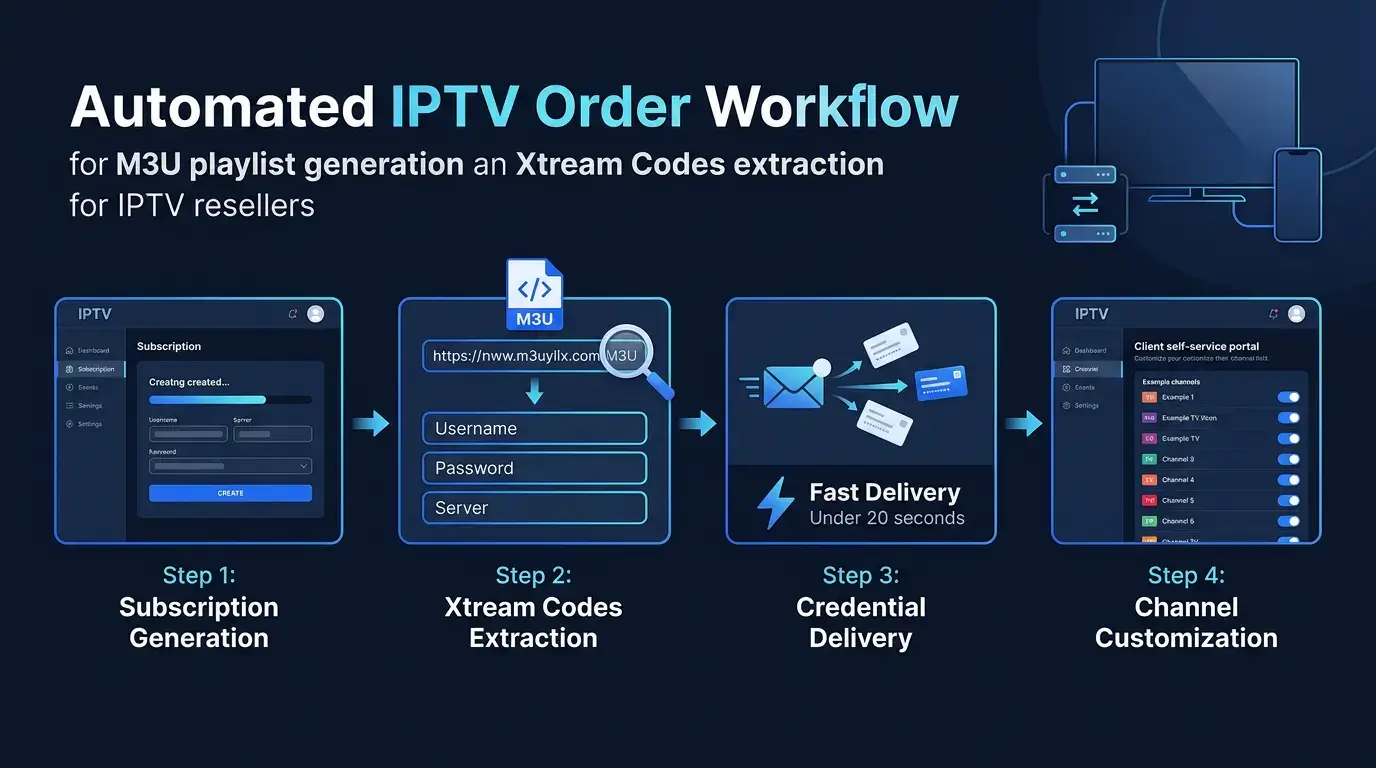
Automate Xtream Codes extraction, credential delivery, and channel customization in under 20 seconds.
If you sell IPTV subscriptions, you already know the routine. A client pays, you open the panel, generate their subscription, pull the username, password, and server out of the M3U link, paste it into a message, send it, then wait for them to ask you to remove three channels they don't want. Do that fifteen times a day and it's manageable. Do it fifty times a day and it eats your entire schedule.
That's exactly why so many resellers go looking for an m3u playlist generator. But here's the truth: generating the link was never the hard part. The hard part is everything that happens after the panel spits it out. Let's break down what that process actually involves and where automation needs to step in.
📖 Table of Contents
- 1. What is an m3u playlist generator, and why does it matter for resellers?
- 2. The four steps every IPTV order actually requires
- 3. Why a custom m3u link generator script becomes a scaling trap
- 4. How does Autotaskclick automate Xtream Codes extraction?
- 5. Can clients customize their own channel list?
- 6. How do you handle buffering and switch servers without manual rework?
- 7. What does it cost to automate m3u generation and delivery?
- 8. Getting started in 5 steps
- 9. Stop patching scripts together
What is an m3u playlist generator, and why does it matter for resellers?
An m3u playlist generator is a tool that produces the M3U link your panel uses to bundle a client's server address, username, and password into one URL. Your reseller panel does this automatically the moment you create a subscription, but the link itself is just a single URL built for the app to read, not for a human to use.
That's the part beginners miss. Clients on modern apps like TiviMate, IPTV Smarters, or IBO Player don't want to paste a long M3U string. They want the server, username, and password as Xtream Codes, because that format loads categories, VOD, and EPG data automatically instead of dumping a flat channel list. So the reseller's real job isn't generating the link. It's turning that link into three clean fields the client can actually use, fast, every single time.
The four steps every IPTV order actually requires
Strip away the marketing language and every IPTV order breaks down into four steps:
- Generate the subscription from the reseller panel
- Extract the Xtream Codes (username, password, server) from the M3U link
- Send the credentials to the client in a readable message
- Customize the client's channel list based on what they want
Most resellers we talk to have automated exactly one of these four steps, usually the first one, because the panel does that part for them by default. The other three still happen by hand: copying values out of a URL, pasting them into a template, sending an email, and manually removing channels one username at a time. If you've been telling yourself you're "mostly automated" because step one runs itself, you're not as far along as you think. For a full breakdown of which tasks resellers wrongly assume are automated, see our guide on manual tasks to avoid.
Why a custom m3u link generator script becomes a scaling trap
We worked with a reseller in Italy who'd already built his own script. It pulled the username, password, and server from the M3U link and dropped them into a template message he'd written himself. When we first suggested he try our plugin instead, he turned us down. More than once.
Here's what he didn't realize at the time: his script only automated one of the four steps. He was still manually generating each subscription from the panel, still sending the message himself, and still customizing every client's channel list by hand. He'd built something that felt like automation but was really just a faster way to do a quarter of the job.
He got stuck around 30 orders a day and couldn't figure out why scaling felt impossible no matter how much he improved his script. This is common. If you're editing values inside a manually copied M3U link, a single password change or panel migration breaks it and you're back to square one.
Eventually he gave Autotaskclick a real try. Once all four steps ran automatically, he had time to actually test new marketing strategies instead of babysitting his own script. He passed 100 orders a day and is still climbing. The lesson isn't that his script was badly written. It's that automating one step out of four was never going to get him past a ceiling built into the other three.
How does Autotaskclick automate Xtream Codes extraction?
Autotaskclick pulls the username, password, and server straight from the subscription the moment it's generated, formats them into your branded message template, and delivers the full credential set to the client within 20 seconds. No copying values out of a URL, no manually building a message, no separate step for sending it.
The email templates are fully customizable too, so the message your client receives still looks and sounds like your brand, not a generic system notification. You can see the full breakdown of what's automated on the platform features page.
Can clients customize their own channel list?
Yes. Autotaskclick includes a client area where the end customer can adjust their own channel list without messaging you first.
This solves a problem most resellers don't think about until they're drowning in it: channel customization requests. Every time a client wants three channels removed or five added, that's a support ticket landing in your inbox. Giving clients a self-service area to handle that themselves removes an entire category of manual work, and clients tend to prefer it anyway since they get instant control instead of waiting on a reply.
How do you handle buffering and switch servers without manual rework?
You switch the client to a different server through the panel, and Autotaskclick regenerates their credentials without you having to rebuild anything from scratch.
We had a client in Spain who was buffering constantly on the Kemo server he'd been assigned by default. The server simply wasn't supported well in his region. We switched him to Strong 8K and the buffering stopped immediately. That kind of server swap happens more often than people expect, and it shouldn't mean starting the whole four-step process over by hand.
Autotaskclick supports Xtream UI, XUI One, Kemo, Strong, and other panels can be added with adjustments, so switching servers doesn't mean switching your entire workflow. If you're dealing with a recurring buffering complaint, our support team can help confirm which server fits a client's region before you make the change.
What does it cost to automate m3u generation and delivery?
Autotaskclick starts with your first 20 orders free, then charges per order on a volume-discount scale: $0.55 per order for your first 100 orders, $0.45 per order between 100 and 500 orders, and $0.35 per order once you pass 500. There are no monthly fees and no setup costs.
That pricing structure matters if you're comparing this to building your own script. A script might feel free upfront, but it costs you in the three steps it doesn't automate, and in the hours you spend maintaining it every time a panel updates or a password changes. Full pricing details are on our pricing plans page.
Getting started in 5 steps
- Sign up and claim your free trial (your first 20 orders are free)
- Connect your IPTV panel and email settings
- Connect your payment gateways (PayPal, Stripe, and others)
- Set up your checkout, sign-up, and sign-in pages
- Integrate the checkout page on your website and start taking orders
Setup usually takes about 30 minutes. It runs longer if a client's email has no authentication on file or if there's trouble logging into a payment account during integration, but for most resellers it's a same-day process. Once you're live, the next priority is deciding how to reinvest the hours you get back. Our guide on how to scale your IPTV business covers what to do with that time once the four steps stop eating your day.
Stop patching scripts together
An m3u playlist generator was never the finish line. Generating the link is the easy 25%. Extracting the Xtream Codes, messaging the client, and handling channel customization make up the other 75%, and that's where most resellers, including the ones who've built their own scripts, are still stuck doing manual work.
Automate all four steps and the ceiling most resellers hit around 20 to 30 orders a day stops being a wall. Whether you get there with your own tooling or with a platform built specifically for this, the goal is the same: stop touching every order by hand.
❓ Frequently Asked Questions
What is an M3U playlist generator for IPTV resellers?
An M3U playlist generator produces the M3U link that bundles a client's server address, username, and password into one URL. However, most clients prefer Xtream Codes format, which requires extracting these values separately for use in apps like TiviMate and IPTV Smarters.
How do I extract Xtream Codes from an M3U link?
Autotaskclick automatically extracts Xtream Codes (username, password, server) from the subscription the moment it's generated and delivers them to your client within 20 seconds—no manual copying or pasting required.
What IPTV panels does Autotaskclick support?
Autotaskclick supports Xtream UI, XUI One, Kemo, Strong, and other panels can be added with adjustments. Switching servers doesn't mean switching your entire workflow.
Can clients customize their own channel list?
Yes. Autotaskclick includes a client area where customers can adjust their own channel list without contacting you—cutting support tickets by up to 70%.
How much does Autotaskclick cost?
Autotaskclick starts with 20 free orders, then charges $0.55 per order for the first 100 orders, $0.45 for 100-500 orders, and $0.35 for 500+ orders. No monthly fees or setup costs.